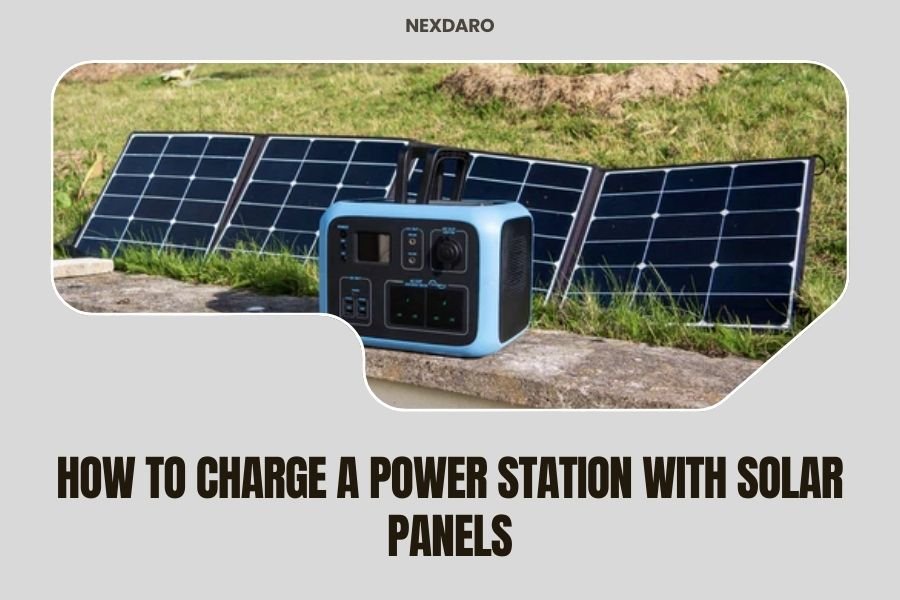
To charge a power station with solar panels, connect the solar panel output cable to your power station’s DC input port using the proper adapter cable that matches both voltage and amperage specifications.
The charging process requires direct sunlight exposure on your solar panels while maintaining clean panel surfaces and optimal positioning toward the sun throughout the day.
What You Need Before Starting
You’ll need compatible solar panels that match your power station’s input requirements. Most power stations accept 12V to 24V DC input, but some larger units can handle up to 60V or more.
Check your power station’s manual for the exact voltage range and maximum amperage it can accept. Using incompatible panels can damage your equipment or create safety risks.
Essential Equipment Checklist
- Solar panels (portable or rigid types work)
- MC4 to DC adapter cable (usually included with power stations)
- Extension cables if needed for positioning
- Cleaning cloth for panel maintenance
Understanding Your Power Station’s Input Specs
Power stations display their solar input requirements in watts and voltage ranges. A typical 500Wh unit might accept 60W-120W of solar input at 12V-24V DC.
Larger 1000Wh+ units often handle 200W-400W of solar input with higher voltage tolerance. Always stay within these limits to avoid damage.
Reading the Input Label
Look for a label near your DC input port. It shows maximum voltage, amperage, and wattage. For example: “DC 12V-24V, 10A Max, 120W Max” tells you exactly what solar setup will work safely.
What Happens If You Exceed Limits
Overvoltage can fry your power station’s charging circuit. Too much amperage can overheat components. Most units have protection circuits, but it’s better not to test them.
Choosing the Right Solar Panels
Portable folding panels work great for most power stations. They’re lightweight, weather-resistant, and come with built-in charge controllers to prevent overcharging.
Rigid panels offer better efficiency but require separate mounting and charge controllers. They work well for permanent or semi-permanent setups.
Panel Wattage Guidelines
Match your panel wattage to your power station’s capacity and usage needs. A 500Wh power station pairs well with 100W-200W of solar panels for daily recharging.
For 1000Wh+ units, consider 200W-400W panel arrays. More panels mean faster charging but also higher costs and more equipment to manage.
Monocrystalline vs Polycrystalline Panels
Monocrystalline panels cost more but perform better in low-light conditions and take up less space. Polycrystalline panels offer good value for budget-conscious buyers.
From what I researched, most experts recommend monocrystalline for portable applications because every bit of efficiency matters when you’re off-grid.
Step-by-Step Connection Process
Start by placing your solar panels in direct sunlight facing south (in the Northern Hemisphere). Avoid shadows from trees, buildings, or clouds when possible.
Connect the MC4 cables from your solar panels to the DC adapter cable that came with your power station. These connectors only fit one way, so don’t force them.
Making the Connection
Plug the adapter cable into your power station’s DC input port. You should hear a click or see a charging indicator light turn on within seconds.
If nothing happens, check your connections and make sure the panels are getting direct sunlight. Cloudy conditions can reduce charging to near zero.
Troubleshooting Connection Issues
No charging indicator? First, verify your panels are producing power by checking the voltage with a multimeter if you have one. Clean connections often solve mysterious charging problems.
Still not working? Try a different cable or check if your power station is already fully charged – most units stop accepting charge at 100%.
Optimizing Your Solar Charging Setup
Position matters more than you might think. Angling your panels toward the sun increases power output by 20-40% compared to flat placement.
Adjust panel angle 2-3 times per day if you’re around to maximize collection. Even small adjustments make a noticeable difference in charging speed.
Seasonal Positioning Tips
In summer, tilt panels at a lower angle (about 15-30 degrees from horizontal). Winter requires steeper angles (45-60 degrees) to catch the lower sun.
Many portable panels come with adjustable kickstands that make angle changes quick and easy.
Dealing with Partial Shade
Even small shadows can cut charging power in half. If one panel in a series gets shaded, it affects the whole string’s output.
Reposition panels or use power optimizers if partial shade is unavoidable. Sometimes moving just a few feet makes all the difference.
Charging Time Expectations
A 100W solar panel in ideal conditions produces about 80-90W of usable power. Expect 5-6 hours of good sun to fully charge a 500Wh power station with this setup.
Real-world conditions rarely match ideal lab tests. Plan for 7-8 hours of daylight charging to account for clouds, dust, and less-than-perfect positioning.
Weather Impact on Charging Speed
| Weather Condition | Expected Power Output | Charging Impact |
|---|---|---|
| Full Sun | 90-100% rated power | Normal charging speed |
| Light Clouds | 60-80% rated power | 25-40% slower |
| Heavy Clouds | 20-40% rated power | 60-80% slower |
| Rain/Storm | 10-20% rated power | Minimal charging |
Temperature Effects You Should Know
Solar panels actually work better in cold weather, producing 10-15% more power at 32°F compared to 80°F. Hot summer days reduce panel efficiency.
Your power station’s battery charges slower in extreme cold, though. Keep the unit at moderate temperatures when possible for best results.
Maintenance and Care Tips
Clean panels work better than dirty ones. Dust, bird droppings, and water spots can reduce power output by 10-25%. A simple water rinse works for most cleaning needs.
Use a soft cloth and mild soap for stubborn dirt. Avoid abrasive cleaners that can scratch the panel surface and reduce light transmission.
Storage Best Practices
Store portable panels in their carrying cases when not in use. Protect connector ends with dust caps to prevent corrosion from moisture and salt air.
Keep cables coiled loosely to prevent damage. Tight coiling can break internal wires over time, especially in cold weather.
When to Replace Components
Solar panels last 20-25 years with minimal power loss. Cables and connectors wear out faster, typically needing replacement every 5-10 years depending on use.
Watch for cracked panel surfaces, corroded connectors, or cables that feel stiff and brittle. These signs indicate it’s time for replacements.
Safety Considerations
Solar panels produce electricity whenever light hits them, even on cloudy days. Always assume they’re “live” and handle connections carefully.
Never work on connections during storms or when panels are wet. Water and electricity don’t mix well, and you could get shocked or damage equipment.
Preventing Overcharging
Modern power stations have built-in charge controllers that prevent overcharging damage. The unit will automatically stop accepting power when the battery reaches full capacity.
You can safely leave solar panels connected all day without worry. The protection circuits handle everything automatically.
Fire Prevention Basics
Keep connections tight and clean to prevent arcing. Loose connections create heat and can start fires, especially in dry conditions.
Don’t cover charging power stations with blankets or tarps. They need airflow to stay cool during charging cycles.
Common Problems and Solutions
Slow charging usually means dirty panels, poor positioning, or cloudy weather. Check these factors before assuming equipment problems.
No charging at all often indicates loose connections, blown fuses, or incompatible voltage levels. Double-check your specs and connections first.
When Professional Help Makes Sense
Most solar charging issues are DIY-fixable with basic troubleshooting. But if you’re seeing sparks, burning smells, or equipment damage, stop immediately and consult professionals.
Warranty coverage often requires professional installation or repair for permanent setups. Check your terms before attempting major fixes yourself.
Conclusion
Charging your power station with solar panels gives you clean, renewable energy wherever you go. The process is straightforward once you understand your equipment’s requirements and follow proper connection procedures.
Start with compatible panels, make secure connections, position everything for maximum sun exposure, and maintain clean equipment. With these basics covered, you’ll enjoy reliable off-grid power for years to come.
Remember that patience pays off with solar charging. It’s slower than wall outlets but infinitely more sustainable and available in remote locations where traditional power isn’t an option.
How long does it take to charge a 1000Wh power station with a 200W solar panel?
In ideal conditions, expect 6-8 hours of direct sunlight to fully charge a 1000Wh power station with a 200W solar panel. Real-world conditions with clouds, dust, and imperfect positioning typically extend this to 8-12 hours of daylight charging.
Can I use any solar panel with my power station?
No, you need panels that match your power station’s voltage and amperage specifications. Check your manual for acceptable input ranges, typically 12V-24V for smaller units and up to 60V+ for larger stations. Using incompatible panels can damage your equipment.
What happens if I connect too many solar panels to my power station?
Exceeding your power station’s maximum input voltage or amperage can damage the internal charging circuits. Most units have protection features that shut down charging when limits are exceeded, but it’s better to stay within specifications to avoid potential damage.
Do solar panels work on cloudy days for charging power stations?
Yes, but at greatly reduced efficiency. Light clouds cut power output to 60-80% of normal levels, while heavy overcast conditions may only produce 20-40% of rated power. You’ll still get some charging, but it will be much slower than sunny conditions.
Should I leave my solar panels connected to my power station overnight?
It’s perfectly safe to leave panels connected overnight. Solar panels produce no power in darkness, and your power station’s charge controller prevents reverse current flow that could drain the battery. Many people leave their systems connected 24/7 for convenience.