
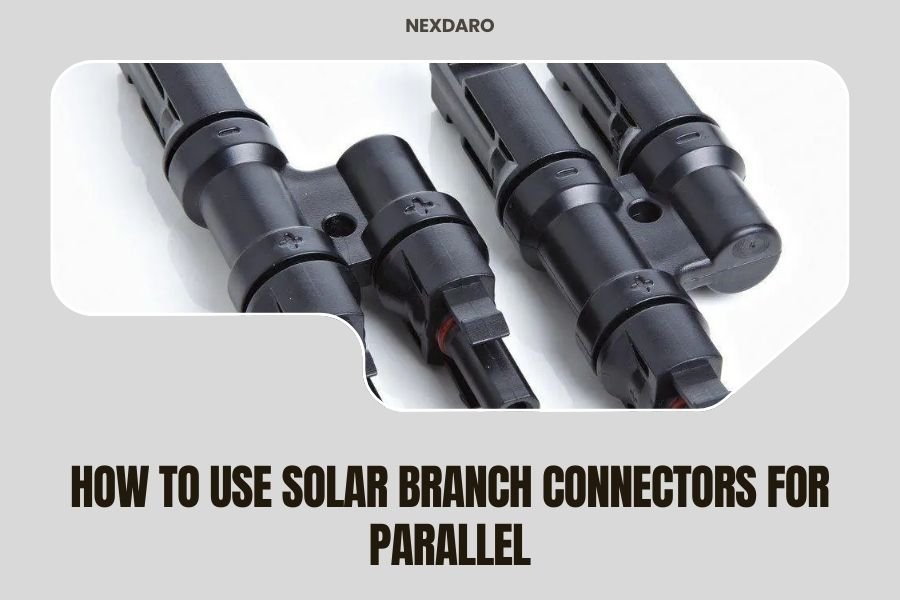
Solar branch connectors allow you to wire multiple solar panels in parallel by connecting positive terminals together and negative terminals together, doubling your power output while maintaining the same voltage.
You’ll need MC4 branch connectors (also called Y-connectors), matching solar panels, and basic electrical safety knowledge to create a parallel solar array that charges your portable power station faster.
What Are Solar Branch Connectors
Think of solar branch connectors as electrical splitters for your solar setup. They’re small plastic devices with MC4 connections that let you combine multiple solar panel outputs into one cable.
These Y-shaped connectors have one input and two outputs (or vice versa). You connect two panel cables to the branched ends and run one cable to your power station.
Most branch connectors handle 15-30 amps safely. They’re weatherproof and built for outdoor use. I found that quality connectors cost $10-20 per pair and last for years.
Why Connect Solar Panels in Parallel
Parallel connections double your charging speed without changing voltage. If you have two 100-watt panels, you get 200 watts total output.
Your power station charges faster on cloudy days too. When one panel gets shaded, the other keeps working at full power. Series connections would reduce both panels’ output.
Parallel setups match most portable power stations better. These devices typically want 12-24 volts input. Parallel keeps voltage the same while boosting current.
Current vs Voltage in Parallel Connections
Here’s how the math works. Two identical panels in parallel give you:
- Same voltage as one panel
- Double the current (amps)
- Double the total power (watts)
Your 18-volt panels stay at 18 volts. But 5 amps becomes 10 amps. Power jumps from 90 watts to 180 watts.
Tools and Materials You Need
Gather these items before starting your parallel connection:
- Two or more matching solar panels
- MC4 branch connectors (one pair minimum)
- MC4 extension cables if needed
- Digital multimeter for testing
- MC4 connector tool (optional but helpful)
Choosing the Right Branch Connectors
Match your connector ratings to your panels. Check the panel specs for maximum current output. Buy connectors rated at least 25% higher than your total current.
I researched connector brands and found that Renogy, HQST, and WindyNation make reliable options. Avoid cheap no-name connectors that might fail outdoors.
Safety Equipment
Solar panels generate electricity whenever light hits them. You can’t turn them off. Wear safety glasses and work in shade when possible.
Keep panels face-down or covered during installation. Even cloudy days produce enough power to shock you.
Step-by-Step Connection Process
Follow these steps to connect your panels safely:
Step 1: Test Your Panels
Use your multimeter to check each panel’s voltage and current. Set the meter to DC voltage and touch the probes to the MC4 connectors.
Healthy panels should read close to their rated voltage in full sun. Write down the numbers for each panel.
Step 2: Identify Positive and Negative Cables
MC4 connectors have different shapes. The male connector (with the pin) is positive. The female connector (with the socket) is negative.
Some cables have red and black wire colors. Red is positive, black is negative. But don’t rely on colors alone – check the connector shapes.
Step 3: Connect the Branch Connectors
Take your positive branch connector. Plug in the positive cables from both solar panels. You’ll hear a click when they seat properly.
Do the same with the negative branch connector and both negative panel cables. Now you have two single cables – one positive, one negative.
Making Secure Connections
MC4 connectors lock together with a twist mechanism. Push them together firmly and twist clockwise until they click. Properly connected cables won’t pull apart by hand.
If they feel loose, disconnect and try again. Water can get into loose connections and cause problems.
Step 4: Test the Parallel Connection
Before connecting to your power station, test the combined output. Put both panels in direct sunlight and measure voltage and current at the branch connector outputs.
You should see the same voltage as one panel but roughly double the current. Small differences are normal due to manufacturing tolerances.
| Measurement | Single Panel | Parallel Connection |
|---|---|---|
| Voltage | 18V | 18V |
| Current | 5A | 10A |
| Power | 90W | 180W |
Connecting to Your Power Station
Most portable power stations need an adapter cable to accept MC4 connectors. Check what input type your station uses – it might be XT60, Anderson Powerpole, or a barrel connector.
Connect the adapter to your branch connector outputs. Then plug the adapter into your power station’s solar input port.
Checking Compatibility
Verify your power station can handle the increased current. Two 5-amp panels create 10 amps total. Make sure your station’s solar controller can process that much power.
I found that most stations rated for 200+ watts handle dual panel setups fine. Smaller stations might limit the input current automatically.
Common Connection Mistakes
Watch out for these errors that can damage your equipment:
Mixing Panel Types
Don’t parallel panels with different voltages. A 12V panel and 18V panel won’t work well together. The lower voltage panel limits the higher one.
Stick to identical panels or panels with very similar voltage ratings. Power ratings can differ slightly without problems.
Overloading Your Power Station
More panels aren’t always better. Your power station’s charge controller has limits. Exceeding them can cause overheating or component failure.
Check your manual for maximum solar input specs. Stay within those limits even if you can physically connect more panels.
Loose Connections
Outdoor connections must be weatherproof. Loose MC4 connectors let moisture in and create resistance. This causes voltage drops and potential fire hazards.
Test connections periodically by gently pulling on the cables. They should feel solid and immovable.
Troubleshooting Parallel Solar Arrays
When your setup isn’t working right, try these diagnostic steps:
Low Power Output
If you’re getting less power than expected, check each panel individually. Disconnect the branch connectors and test panels one at a time.
One weak panel can drag down the whole array’s performance. Look for shading, dirt, or physical damage on underperforming panels.
No Power at All
Start with the connections closest to your power station and work backward. Check the adapter cable, then the branch connectors, then individual panel cables.
A single bad connection can stop all power flow. I’ve seen tiny amounts of corrosion block entire solar arrays.
Inconsistent Charging
Intermittent problems usually mean loose connections or failing connectors. Replace any connectors that feel loose or show signs of overheating.
Brown or black marks around connectors indicate heat damage. Replace those connectors immediately for safety.
Expanding Your Solar Array
You can add more panels to your parallel array with additional branch connectors. Each branch point doubles your connection options.
Four panels need two levels of branching. Connect panels 1+2 to one branch, panels 3+4 to another branch, then connect both branches together.
Planning Larger Arrays
Keep total current under your power station’s limits. Eight 5-amp panels create 40 amps – too much for most portable stations.
Consider series-parallel combinations for big arrays. This balances voltage and current within your equipment’s specifications.
Maintenance and Storage
Check your connections monthly during active use. Look for loose fittings, damaged cables, or signs of overheating.
Clean panel surfaces regularly. Dirt and debris reduce output significantly. Use water and a soft brush – avoid harsh chemicals.
Winter Storage Tips
Store panels and connectors in a dry location when not in use. Disconnect all cables to prevent corrosion at connection points.
Extreme temperature changes can crack plastic connectors. Bring branch connectors indoors if possible.
Safety Considerations
Solar installations involve electrical current and outdoor conditions. Take these precautions seriously:
- Never work on wet panels or in rain
- Cover panels when making connections
- Use insulated tools when possible
- Check local electrical codes for requirements
Fire Prevention
Loose connections create heat and potential fire risks. Many experts recommend checking connections quarterly (Solar Power World).
Install panels on non-flammable surfaces when possible. Keep flammable materials away from all electrical connections.
When to Call a Professional
Simple parallel connections are safe for most DIY enthusiasts. But consider professional help for:
- Arrays over 400 watts
- Permanent roof installations
- Ground-fault protection requirements
- Local permit requirements
Electricians familiar with solar systems can ensure code compliance and safety. The extra cost might be worth the peace of mind.
Conclusion
Solar branch connectors make it simple to double or triple your portable power station’s charging speed. The key is matching your panels properly and making secure connections.
Start with two identical panels and quality MC4 branch connectors. Test everything before connecting to your power station. Check connections regularly for safety.
Your parallel solar array will charge your power station faster and give you more energy independence. Whether you’re camping, living off-grid, or preparing for emergencies, this setup provides reliable renewable power when you need it most.
What happens if I connect different wattage panels in parallel?
Different wattage panels work fine in parallel as long as their voltages match closely. The higher wattage panel will produce more current, but both will operate at their maximum capability without limiting each other.
Can I use regular wire nuts instead of MC4 branch connectors?
No, wire nuts aren’t weatherproof and can’t handle DC current safely outdoors. MC4 connectors are specifically designed for solar applications with proper sealing and current ratings that prevent failures and fires.
How many solar panels can I connect in parallel?
The limit depends on your power station’s maximum input current rating. Add up each panel’s current output and stay below your device’s specification. Most portable stations handle 2-4 panels before reaching their input limits.
Do I need a fuse when connecting panels in parallel?
Portable power stations typically have built-in protection, but adding inline fuses between your panels and the station provides extra safety. Use fuses rated slightly above your total array current for optimal protection.
Why is my parallel array producing less power than expected?
Check for shading on any panel, loose connections, or mismatched panel voltages. Even partial shading on one panel can reduce total output. Also verify your power station isn’t limiting input due to battery charge level or temperature.
