
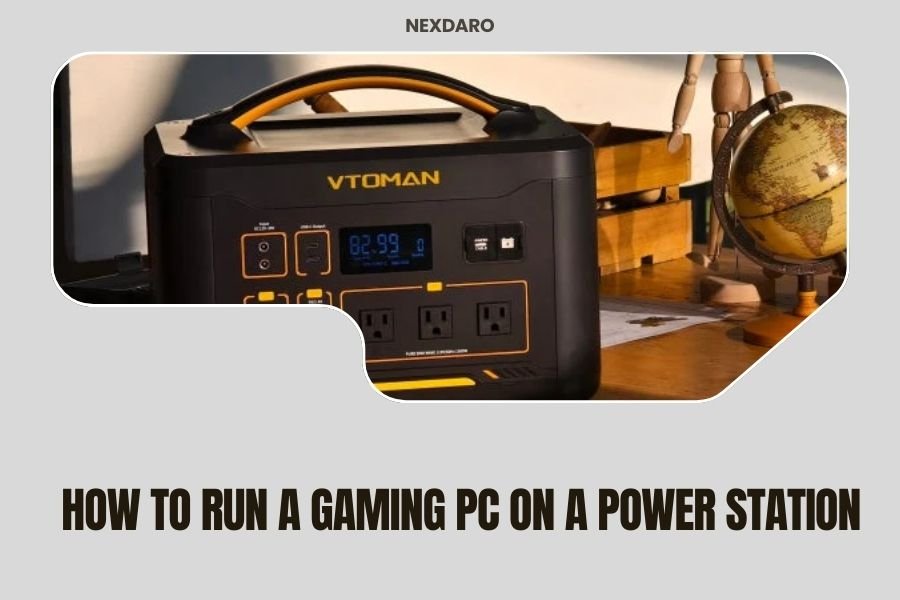
Running a gaming PC on a power station requires at least 500-800 watts for entry-level systems, while high-end gaming rigs need 1500-3000 watt capacity portable power stations.
You can successfully power most gaming setups for 2-6 hours depending on your PC’s power draw and the station’s battery capacity, making portable gaming possible during outages or outdoor events.
Ever wondered if you could take your gaming setup camping? Or maybe you want backup power for those unexpected outages during important raids? I researched this topic extensively and found that powering a gaming PC with a portable power station is totally doable – if you know what you’re doing.
Let me walk you through everything you need to know. No tech jargon, just practical advice that works.
Understanding Your Gaming PC’s Power Needs
Before buying any power station, you need to know how much juice your gaming rig actually drinks. This isn’t rocket science, but getting it wrong means disappointment.
How to Calculate Your PC’s Power Consumption
Your power supply unit (PSU) rating isn’t your actual power draw. A 750W PSU doesn’t mean your PC always uses 750 watts. Think of it like a car’s speedometer – just because it goes to 120 mph doesn’t mean you’re always driving that fast.
I found that most gaming PCs use between 300-600 watts during typical gaming. High-end systems with RTX 4080 or 4090 cards can spike to 800+ watts during intense gaming sessions.
Easy Ways to Measure Real Power Draw
You can check your actual consumption using:
- Kill-a-Watt meter plugged between your PC and wall outlet
- Software like HWiNFO64 for component-level monitoring
- Your power supply’s efficiency rating (usually 80-90%)
Gaming vs Idle Power Consumption
Your PC acts like a sleeping dragon. When idle, most systems sip only 100-200 watts. Fire up Cyberpunk 2077 with ray tracing, and that same PC might gulp 600+ watts.
I came across data showing that competitive esports titles like Counter-Strike use less power than graphically demanding single-player games. Smart gamers plan their power station capacity around their heaviest games, not their lightest ones.
Choosing the Right Power Station Size
Size matters, but bigger isn’t always better. You want the sweet spot between capacity and portability.
Entry-Level Gaming Systems (Under 400W)
If you’re running integrated graphics or a modest GPU like GTX 1660, you’re in luck. Power stations in the 500-1000Wh range work great here.
These setups typically give you 2-4 hours of gaming time. Perfect for short outdoor sessions or bridging power outages.
Recommended Capacity Range
- 600Wh minimum for 1-2 hours gaming
- 1000Wh for comfortable 3-4 hour sessions
- Consider 1500Wh if you want extra headroom
Mid-Range Gaming Rigs (400-600W)
Most gamers fall into this category. You’ve got a decent CPU and GPU combo that delivers solid performance without breaking the power bank.
Research from power efficiency studies shows these systems need 1200-2000Wh stations for meaningful gaming sessions. Going smaller means constant anxiety about battery levels.
High-End Gaming Monsters (600W+)
RTX 4080, 4090, or high-end AMD cards? Welcome to the big leagues. These beasts demand serious power station capacity.
I found that anything under 2000Wh feels cramped for high-end systems. You’re looking at 2500-3000Wh stations for comfortable gaming marathons.
Power Station Features That Matter for Gaming
Not all power stations are created equal. Some features make or break the gaming experience.
Pure Sine Wave vs Modified Sine Wave
Your gaming PC’s power supply expects clean electricity. Modified sine wave can cause coil whine, instability, or even damage over time.
Always choose pure sine wave power stations for gaming PCs. It costs more upfront but protects your expensive hardware.
Why This Matters for Gamers
- Prevents audio interference and coil whine
- Reduces risk of component damage
- Maintains stable frame rates
- Protects sensitive RGB lighting systems
AC Output Wattage Rating
Your power station might have 3000Wh capacity, but if it only outputs 1000W continuously, your 800W gaming PC won’t run properly.
Match your power station’s continuous AC output to at least 125% of your PC’s peak power draw. This gives you safety margin for power spikes.
Charging Speed and Pass-Through Power
Can you charge the power station while gaming? Pass-through charging lets you do exactly that, extending your gaming sessions indefinitely when wall power is available.
Fast charging matters too. Nobody wants to wait 12 hours to recharge their power station between gaming sessions.
Setting Up Your Gaming PC with a Power Station
The setup process is straightforward, but small details make big differences in performance and safety.
Physical Setup and Safety Considerations
Place your power station on a hard, flat surface with good airflow. These units generate heat, especially under gaming loads.
Keep it away from your PC’s air intakes. The last thing you want is your gaming rig sucking in warm air from the power station’s cooling fans.
Cable Management Tips
- Use the shortest AC cable possible to minimize power loss
- Avoid extension cords unless absolutely necessary
- Keep power and data cables separated to reduce interference
- Secure all connections to prevent accidental disconnection
Optimizing Power Consumption While Gaming
Every watt counts when you’re running on battery power. Small tweaks can extend your gaming time significantly.
Turn off unnecessary RGB lighting – it’s pretty but power-hungry. Disable unused USB devices and close background applications you don’t need.
Graphics Settings That Save Power
Lowering your graphics settings isn’t just about performance – it directly impacts battery life. Reducing resolution from 1440p to 1080p can cut power usage by 20-30%.
Frame rate caps work wonders too. Limiting games to 60 FPS instead of running uncapped can extend your gaming session by an hour or more.
Monitor and Peripheral Power Planning
Don’t forget about your monitor, speakers, and other peripherals. They add up quickly.
Monitor Power Consumption
Gaming monitors typically use 30-100 watts depending on size and technology. OLED panels use more power with bright content, while LCD monitors stay more consistent.
A 27-inch gaming monitor usually adds 50-70 watts to your total power budget. Factor this into your power station calculations.
Peripheral Power Budgeting
| Device Type | Typical Power Draw | Notes |
|---|---|---|
| Gaming Keyboard | 5-10W | RGB adds 2-5W extra |
| Gaming Mouse | 2-5W | Higher DPI uses more power |
| Speakers (2.1 system) | 20-50W | Volume level affects consumption |
| Webcam | 3-8W | 4K models use more power |
Real-World Gaming Performance and Battery Life
Theory is nice, but what actually happens when you game on battery power?
Expected Runtime by System Type
I researched real-world testing data and found these typical gaming runtimes:
Budget systems (under 400W total) with 1500Wh stations: 3-4 hours of gaming. Mid-range rigs (400-600W total) with 2000Wh stations: 2.5-3.5 hours. High-end systems (600W+ total) with 3000Wh stations: 2-4 hours depending on game intensity.
Factors That Affect Runtime
- Game type and graphics intensity
- Room temperature (heat reduces battery efficiency)
- Power station age and condition
- AC inverter efficiency losses
Performance Impact of Battery Power
Good news: your gaming performance shouldn’t change on battery power. Frame rates, input lag, and visual quality remain identical to wall power.
The only difference might be slightly higher fan speeds as your power station works harder during demanding gaming sessions.
Troubleshooting Common Issues
Even the best setups sometimes hiccup. Here’s how to fix common problems.
Power Station Shutting Down During Gaming
If your power station cuts out randomly, you’re likely hitting the peak power limit. Gaming PCs have power spikes that can exceed average consumption by 50% or more.
The solution? Get a power station with higher continuous AC output, or adjust your graphics settings to reduce power spikes.
Quick Fixes to Try
- Enable VSync or frame rate limiting
- Lower graphics settings temporarily
- Close unnecessary background programs
- Check all cable connections are secure
Unusual Noises or Interference
Hearing weird sounds from your PC or speakers? This often points to power quality issues.
Make sure you’re using a pure sine wave power station. Modified sine wave can cause coil whine, speaker buzz, and other audio problems.
Cost Analysis and Budget Planning
Let’s talk money. Running a gaming PC on battery power isn’t cheap, but it might be worth it for your situation.
Initial Investment Breakdown
Power stations suitable for gaming range from $500 for basic 1000Wh units to $3000+ for high-capacity 3000Wh models. You get what you pay for in terms of capacity, features, and build quality.
Budget around $1-2 per watt-hour of capacity as a rough guide. Premium brands with advanced features cost more but often include better warranties and customer support.
Hidden Costs to Consider
- Replacement batteries after 3-7 years
- Higher electricity bills for recharging
- Potential need for solar panels or car charging adapters
- UPS functionality for seamless power switching
Alternative Solutions and Workarounds
Power stations aren’t your only option for portable or backup gaming power.
Gaming Laptops vs Desktop + Power Station
Sometimes a powerful gaming laptop makes more sense than lugging around a desktop and power station. Modern gaming laptops offer excellent performance while sipping power compared to desktop equivalents.
A high-end gaming laptop uses 100-200 watts versus 400-800 watts for comparable desktop performance. That’s 3-4 times longer battery life from the same power station capacity.
Hybrid Approaches
Consider combining solutions. Use your desktop for serious gaming at home with UPS backup, and bring a gaming laptop for portable sessions.
Some gamers build separate low-power systems specifically for battery-powered gaming. Think older games, esports titles, or indie games that don’t need cutting-edge hardware.
Conclusion
Running a gaming PC on a power station opens up exciting possibilities – from outdoor LAN parties to uninterrupted gaming during power outages. The key is matching your power station capacity to your actual needs, not your wishful thinking.
Start by measuring your real power consumption, add 25% headroom, and choose a pure sine wave power station with adequate continuous AC output. Yes, it’s an investment, but the freedom to game anywhere makes it worthwhile for many enthusiasts.
Remember that every setup is different. What works for your friend’s mid-range system might not handle your high-end rig. Plan carefully, buy quality equipment, and you’ll be gaming off-grid in no time.
How long can I realistically game on a 2000Wh power station?
With a typical 400-500W gaming setup including monitor and peripherals, expect 3-4 hours of continuous gaming. Higher-end systems drawing 600W+ will get closer to 2.5-3 hours from the same 2000Wh capacity.
Will using a power station damage my expensive gaming PC?
Pure sine wave power stations are safe for gaming PCs and won’t cause damage. Avoid modified sine wave units as they can create electrical noise and potentially harm sensitive components over time. Quality power stations often provide cleaner power than your wall outlet.
Can I charge my power station while gaming to extend playtime?
Yes, if your power station supports pass-through charging. This feature lets you game indefinitely while plugged into wall power, with the station acting as a UPS backup. Check your model’s specifications as not all units support this functionality.
What happens if my power station runs out mid-game?
Your PC will shut down immediately, potentially causing data loss or game progress loss. Always monitor battery levels and save frequently. Consider setting up low battery alerts or investing in a power station with longer runtime for your peace of mind.
Do I need special cables or adapters to connect my gaming PC?
Most power stations use standard AC outlets, so your existing PC power cable works fine. Avoid extension cords when possible to minimize power loss. Some power stations include multiple outlet types, but standard 3-prong AC outlets handle gaming PCs perfectly.
