AC outputs provide alternating current at 110V/220V for household appliances, while DC outputs deliver direct current at 12V for car accessories and electronics through power station ports.
Power station AC vs. DC outputs differ in voltage levels, device compatibility, and energy efficiency – AC powers large appliances but DC works better for small electronics and charging.
What Are AC and DC Outputs on Power Stations?
Your power station has different types of ports for good reason. Each one delivers electricity in a specific way that matches what your devices need.
AC stands for alternating current. This is the same power that comes from wall outlets in your home. It switches direction 50 or 60 times per second.
DC means direct current. This flows in one direction only, like the power from a car battery or AA batteries.
Why Power Stations Need Both Types
Think of it like having different sized screwdrivers in your toolbox. You need the right tool for each job.
Your laptop charger expects AC power. Your phone can work with either, but charges faster with the right voltage. Your car cooler only works with 12V DC power.
Without both options, you’d need separate converters for every device. That means more weight, more cost, and more things to break.
AC Power Station Outputs Explained
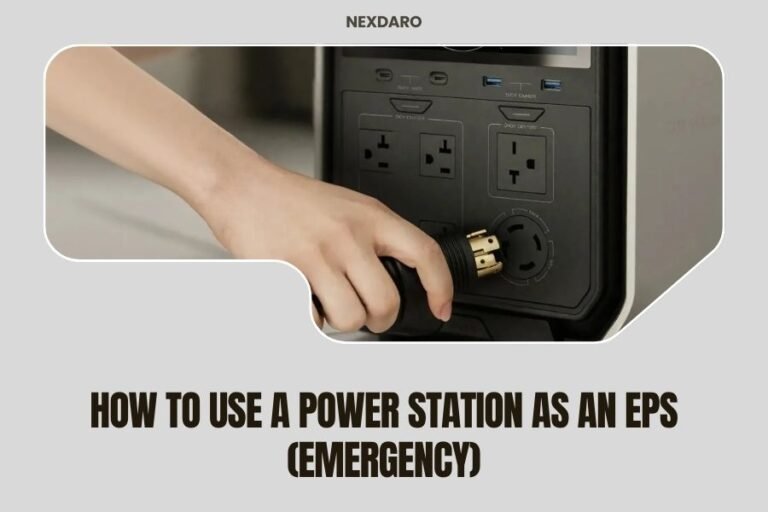
AC outlets on power stations look just like the ones on your wall at home. Most deliver 110V in North America or 220V in Europe.
What Devices Use AC Power
AC ports work best for larger appliances and tools:
- Laptops and desktop computers
- Coffee makers and blenders
- Power tools like drills and saws
- Small refrigerators and microwaves
- CPAP machines and medical devices
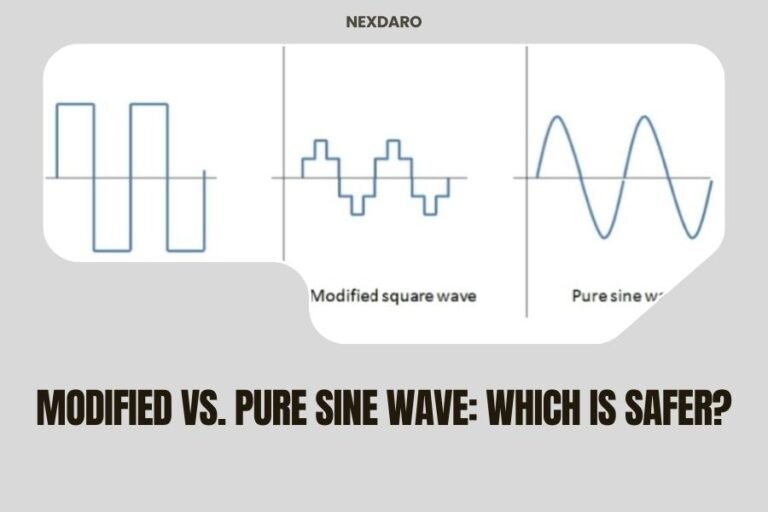
Pure Sine Wave vs Modified Sine Wave
You’ll see these terms when shopping for power stations. Pure sine wave AC power matches what comes from your wall outlet exactly.
Modified sine wave costs less but can cause problems. Some devices buzz, run hot, or don’t work at all. I found that sensitive electronics like CPAP machines need pure sine wave power to work safely.
AC Power Conversion Process
Your power station stores DC power in its battery. When you plug into an AC outlet, an inverter converts DC to AC power.
This conversion wastes about 10-15% of your stored energy. That’s the price you pay for compatibility with household appliances.
DC Power Station Outputs Explained
DC ports come in several shapes and voltages. The most common ones output 12V, just like your car’s electrical system.
Common DC Port Types
Different DC ports serve different purposes:
- 12V cigarette lighter sockets for car accessories
- USB-A ports (5V) for phones and small devices
- USB-C ports with power delivery up to 100W
- Anderson Powerpole connectors for ham radios
- DC barrel jacks in various sizes
USB Power Delivery Explained
Modern power stations include USB-C ports with Power Delivery (PD). These can output 18W, 30W, 60W, or even 100W.
This means you can charge laptops directly without using the AC inverter. That saves battery power and charges faster than most AC adapters.
12V DC Applications
The 12V DC ports work with anything designed for your car:
- Portable refrigerators and coolers
- Air compressors and tire inflators
- LED light strips and work lights
- CB radios and two-way radios
- Dash cameras and GPS units
Key Differences Between AC and DC Outputs
Voltage and Power Levels
AC outputs typically provide much higher power. A basic power station might have 500W AC output but only 120W total from USB ports.
DC outputs work better for lower-power devices. USB ports max out around 100W per port, while 12V sockets usually handle 120-180W.
Energy Efficiency Comparison
DC power skips the conversion step, so it’s more efficient. Using a USB port wastes only 5-10% of your battery power.
AC power goes through an inverter first. This conversion process wastes 10-15% of your stored energy as heat.
Device Compatibility
AC ports work with anything that plugs into your wall at home. This includes most kitchen appliances, power tools, and large electronics.
DC ports match specific voltages. A 12V device won’t work with a 5V USB port, and vice versa.
Charging Speed Differences
Many people assume AC charging is always faster. That’s not true anymore.
USB-C PD can charge phones and tablets faster than AC adapters. I found that direct DC charging often beats the AC route for phones and smaller laptops.
| Port Type | Typical Power | Best For | Efficiency |
|---|---|---|---|
| AC Outlet | 300-3000W | Large appliances | 85-90% |
| USB-C PD | 18-100W | Phones, tablets, small laptops | 90-95% |
| USB-A | 12-18W | Phones, small devices | 90-95% |
| 12V DC | 120-180W | Car accessories | 90-95% |
Choosing the Right Output for Your Needs
For Camping and Outdoor Use
Most camping gear runs on DC power. Portable fridges, LED lights, and phone chargers all work better with DC ports.
You might need AC power for a coffee maker or laptop. But DC ports will handle 80% of your camping electronics more efficiently.
For Emergency Backup Power
Home emergencies call for AC power. Your refrigerator, medical devices, and internet modem all need standard household current.
Look for power stations with at least 1000W AC output for emergency use. Smaller units won’t run essential appliances when the power goes out.
For Work and Professional Use
Mobile professionals need both types. AC power runs laptops, monitors, and tools. DC power charges phones, tablets, and other mobile gear.
Consider how much power each device needs. A gaming laptop might need 150W, while a phone only needs 18W.
Power Consumption Planning
Add up the watts for all your devices. Remember that AC devices use 10-15% more power due to inverter losses.
A 500Wh power station running a 100W AC device will last about 4.2 hours. The same device at 100W DC would run for 4.8 hours.
Common Mistakes to Avoid
Using AC When DC Would Work
Many people plug phone chargers into AC outlets out of habit. This wastes battery power and generates unnecessary heat.
Check if your device has a DC option first. USB-C laptops, phones, and tablets all charge better with DC power.
Overloading Output Ports
Each port type has limits. Most USB-A ports share 30W total, not 30W each.
Read your power station manual carefully. Some units shut down completely if you exceed port limits.
Ignoring Wave Form Requirements
Sensitive devices need pure sine wave AC power. Modified sine wave can damage medical equipment, some chargers, and variable speed motors.
When in doubt, pay extra for pure sine wave output. It’s worth the cost for device safety.
Future Trends in Power Station Outputs
USB-C Taking Over
More devices support USB-C Power Delivery every year. Laptops, tablets, and even some small appliances now charge via USB-C.
I expect future power stations to have more USB-C ports and fewer traditional AC outlets. This shift will improve efficiency and reduce weight.
Wireless Charging Integration
Some power stations now include wireless charging pads on top. This eliminates cables for phones and earbuds.
Wireless charging is less efficient than wired, but the convenience factor makes it popular for casual use.
Conclusion
Understanding AC vs. DC outputs helps you choose the right power station and use it efficiently. AC ports handle large appliances but waste more energy through conversion. DC ports work better for phones, tablets, and car accessories while preserving battery life.
Match your device needs to the right port type. Use DC whenever possible to maximize runtime. Save AC power for devices that truly need it. This approach will get more use from every charge and keep your essential devices running longer during outages or outdoor adventures.
Can I use a DC to AC inverter instead of built-in AC outlets?
Yes, but built-in inverters are usually more efficient and safer. External inverters add another conversion step and potential failure point. Stick with the built-in AC outlets unless you need a specific voltage or wave form.
Why do some devices work poorly with modified sine wave AC?
Modified sine wave creates a stepped approximation of smooth AC power. Motors may run hot, chargers may buzz, and digital clocks can keep incorrect time. Medical devices and audio equipment often require pure sine wave to function properly.
Can I charge my power station while using the outputs?
Most modern power stations support pass-through charging, but this reduces efficiency and creates heat. The charging speed may slow down when outputs are active. Check your manual for specific limitations on simultaneous charging and discharging.
What happens if I exceed the power limit on an output?
Most power stations have built-in protection that shuts down the overloaded port or the entire unit. This prevents damage but means your devices stop working until you reduce the load and reset the system.
Are USB-C PD ports worth the extra cost compared to regular USB-A?
USB-C PD ports can charge laptops, tablets, and phones at full speed with one cable type. They replace multiple AC adapters and reduce the gear you need to carry. The convenience and efficiency gains usually justify the extra cost for most users.