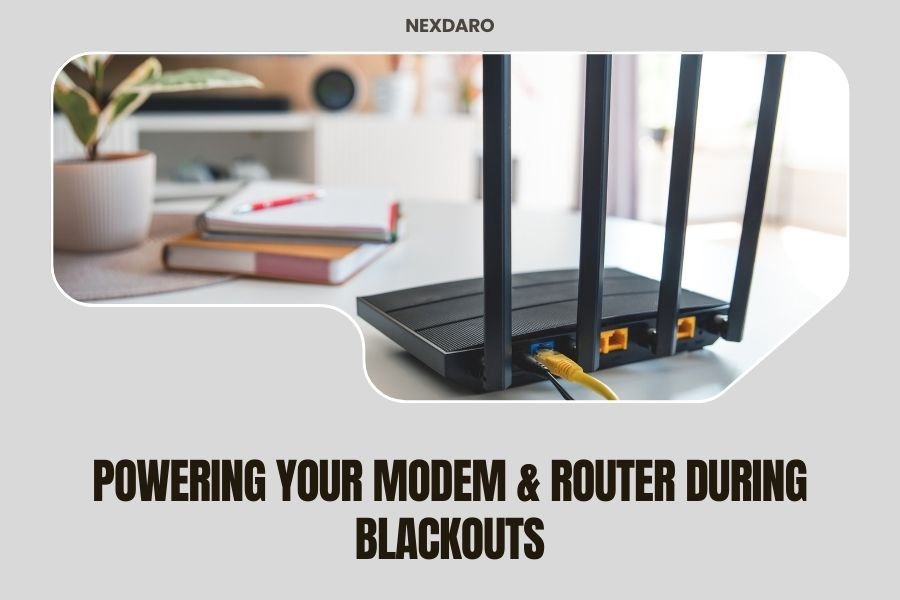
Yes, you can power your modem and router during blackouts using a portable power station with at least 100-200 watts capacity and multiple AC outlets.
Most home internet setups need around 50-100 watts total, so a mid-range power station will keep you connected for 6-12 hours during outages.
Power outages don’t have to mean losing your internet connection. While your neighbors sit in the dark scrolling through cached web pages, you can stay online for work, communication, and entertainment.
I researched the best ways to keep internet running during blackouts. The solution is simpler than you might think, and it doesn’t require rewiring your home or buying expensive backup generators.
Quick Setup Guide for Internet Backup Power
Your internet setup likely includes a modem, router, and maybe a cable box. Each device has different power needs, but the total usually stays under 100 watts.
Here’s what you need to do right now:
- Check the power labels on your modem and router
- Add up the wattage (usually 20-50 watts each)
- Buy a portable power station with double that capacity
- Test everything before the next outage hits
Understanding Your Internet Equipment Power Needs
Cable Modem Power Requirements
Most cable modems use 15-30 watts of power. That’s about the same as a bright LED bulb. I found that popular models like ARRIS and Motorola modems typically draw 20-25 watts during normal operation.
Your modem works hardest when it first boots up. After that, power usage stays pretty steady.
WiFi Router Power Consumption
WiFi routers need more juice than modems. Basic routers use 10-20 watts, while high-performance gaming routers can pull 40-60 watts.
The more devices connected to your WiFi, the more power your router uses. But even with a house full of phones and laptops, the increase is small.
Additional Equipment Considerations
Do you have a cable box or mesh network extenders? These add to your power budget:
- Cable TV boxes: 15-40 watts
- Mesh extenders: 5-15 watts each
- Network switches: 5-20 watts
- VoIP phone adapters: 3-8 watts
Choosing the Right Portable Power Station
Power Capacity Requirements
I found that a 300-watt power station handles most home internet setups easily. This gives you plenty of headroom above your actual needs.
For battery capacity, look for at least 300 watt-hours. This keeps a typical modem and router running for 4-6 hours minimum.
Essential Features to Look For
Not all power stations work well for internet equipment. Here’s what matters most:
- Pure sine wave output (protects sensitive electronics)
- Multiple AC outlets (for modem, router, and extras)
- USB ports (for charging phones and tablets)
- Pass-through charging (use while plugged into wall)
- Quiet operation (no loud fans while you work)
Size and Portability Factors
You want something powerful enough but not too heavy. A 20-30 pound unit offers the best balance of capacity and portability.
Think about where you’ll store it. Can you easily move it to your internet equipment during an outage?
Step-by-Step Connection Process
Pre-Outage Preparation
Don’t wait for the lights to go out. Set up your backup system now while you can see what you’re doing.
First, locate all your internet equipment. Map out where everything plugs in. Take photos of your current setup so you remember how to reconnect everything.
During the Blackout
When power goes out, your internet equipment shuts down immediately. Here’s how to get back online:
Turn on Your Power Station
Press the AC power button on your portable station. Most units take 5-10 seconds to activate their outlets.
Check that the display shows your available battery capacity.
Connect Your Equipment
Plug in your modem first, then wait 30 seconds for it to boot up completely. The lights on your modem will cycle through their startup sequence.
Next, connect your router and wait another 30 seconds. Your WiFi network should appear on your devices within a minute or two.
Test Your Connection
Try loading a website on your phone or computer. If it doesn’t work immediately, give it another minute. Sometimes the connection takes a bit longer during outages.
Runtime Calculations and Battery Life
How Long Will It Last?
This depends on your equipment and battery size. I researched typical scenarios and found these estimates:
| Power Station Size | Equipment Load | Expected Runtime |
|---|---|---|
| 300Wh | Basic modem + router (40W) | 6-7 hours |
| 500Wh | Modem + router + cable box (70W) | 6-8 hours |
| 1000Wh | Full setup with mesh (100W) | 8-10 hours |
Extending Your Runtime
Want to stretch your battery further? Try these tricks:
- Unplug the cable box if you only need internet
- Turn off mesh extenders in unused rooms
- Reduce the number of connected devices
- Lower your router’s WiFi power settings
Common Setup Problems and Solutions
Equipment Won’t Power On
If your modem or router doesn’t start, check these things first:
Make sure the power station’s AC outlets are turned on. Many units have separate buttons for different outlet groups.
Verify that you’re using the original power adapters. Generic adapters might not provide enough current.
Slow or Unstable Internet
Running on battery power shouldn’t slow your internet, but outages can affect your provider’s network too.
If your connection seems sluggish, try restarting your equipment. Unplug everything for 30 seconds, then power up the modem first, followed by the router.
Power Station Shuts Off
This usually means overload protection kicked in. Check that your total equipment draw doesn’t exceed the station’s capacity.
Some power stations also shut down if they get too hot. Make sure yours has good airflow around it.
Alternative Backup Power Methods
UPS Systems vs Power Stations
Uninterruptible Power Supplies (UPS) switch on instantly when power fails. They’re great for computers but usually run for only 15-30 minutes.
Portable power stations take a few seconds to connect manually but can run for hours. For long outages, power stations win easily.
Car Power Inverters
You can power internet equipment from your car using an inverter. This works well if your car is parked close to your house.
Just remember to run your engine every hour or so to avoid draining your car battery.
Solar Charging Options
Many portable power stations accept solar panel input. During multi-day outages, solar panels can extend your runtime significantly.
A 100-watt solar panel can generate enough power to run basic internet equipment during sunny conditions.
Safety Considerations
Indoor Use Precautions
Portable power stations are safe for indoor use, unlike gas generators. They don’t produce any exhaust or carbon monoxide.
Keep your power station on a hard, flat surface with good ventilation. Don’t use it on carpet or soft furniture where it might overheat.
Battery Maintenance Tips
Lithium batteries last longer with proper care. I found that experts recommend charging to 80% for long-term storage (Battery University).
Use your power station at least once every three months. This keeps the battery healthy and ensures everything works when you need it.
Cost Analysis and Investment Planning
Upfront Costs
A good portable power station for internet backup costs $200-600. That might seem like a lot, but compare it to lost productivity during outages.
If you work from home, even one day of lost wages probably covers the cost. Plus, you can use it for camping, tailgating, and other activities.
Long-term Value
Quality power stations last 5-10 years with normal use. That works out to maybe $50-100 per year for reliable backup power.
Many people find they use their power station more than expected. It becomes their go-to solution for outdoor activities and emergency preparedness.
Conclusion
Keeping your internet running during blackouts is easier than most people think. A portable power station gives you hours of connectivity when the grid goes down.
The key is matching your equipment’s power needs with the right battery capacity. Most home internet setups need less than 100 watts, so even mid-range power stations provide plenty of backup time.
Don’t wait for the next storm to test your setup. Get your backup power ready now, and you’ll stay connected when others can’t. Your future self will thank you when you’re the only one on the video call during the next power outage.
What size power station do I need for just a modem and basic router?
A 300-watt power station with 300-500 watt-hours of battery capacity will easily handle a basic modem and router setup. This typically provides 6-8 hours of runtime and costs $200-400. Look for models with pure sine wave output to protect your electronics.
Can I keep my power station plugged in all the time?
Yes, most modern power stations support pass-through charging, which means they can stay plugged into the wall while ready for instant backup power. This keeps the battery topped off and provides seamless power when outages occur. Check your manual to confirm this feature.
Will my internet speed be slower when running on battery backup?
No, running your modem and router on battery power won’t affect your internet speed. The equipment operates normally regardless of power source. Any slowdowns during outages usually come from your internet provider’s network issues, not your backup power setup.
How often should I test my backup internet power system?
Test your backup system monthly by unplugging your equipment from the wall and running it on the power station for 15-30 minutes. This ensures everything works properly and helps maintain battery health through regular use cycles.
What’s the difference between a UPS and a portable power station for internet backup?
UPS systems switch on instantly but typically run for only 15-30 minutes, while portable power stations require manual connection but can run for 6-12 hours. For short outages, UPS is convenient. For extended blackouts, power stations are much better for maintaining internet access.