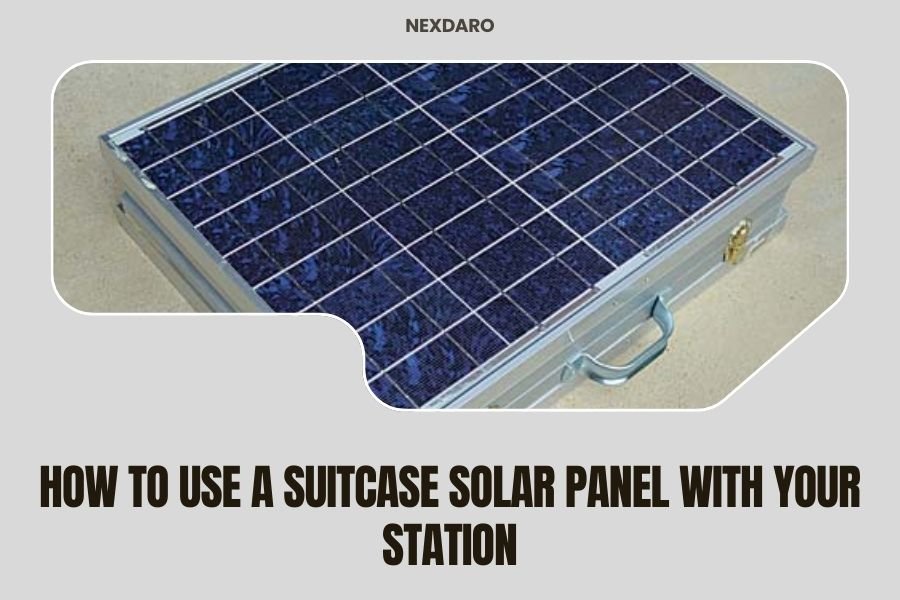
Using a suitcase solar panel with your portable power station involves connecting the panel’s output cables to your station’s solar input port, then positioning the panel in direct sunlight for optimal charging.
The setup process takes just a few minutes and can significantly extend your power station’s runtime during outdoor adventures or emergency situations.
Quick Setup Guide for Solar Panel Connection
You’ll want to get this right the first time. Setting up your suitcase solar panel doesn’t require an engineering degree.
Start by checking your power station’s solar input specifications. Most stations accept 12V to 24V input, but some handle up to 60V or more. Your panel needs to match these requirements.
Matching Voltage and Amperage
Think of voltage like water pressure in a hose. Too much pressure can damage your system. Too little won’t charge effectively.
Your suitcase panel probably outputs 18V to 22V under full sun. This works perfectly with most portable stations rated for 12V to 24V input.
Connector Types You’ll Encounter
Most suitcase panels come with MC4 connectors. These look like small plastic plugs that click together securely.
Your power station might have a different input port. Common types include:
- DC barrel jacks (round plugs)
- Anderson Powerpole connectors
- XT60 connectors (yellow plastic)
- Built-in MC4 inputs
Don’t worry if they don’t match. Adapter cables cost around $15 to $30 and solve this problem quickly.
Step-by-Step Connection Process
Here’s where the rubber meets the road. Follow these steps and you’ll be charging within minutes.
Before You Connect Anything
Turn off your power station completely. Connecting solar panels to live systems can cause voltage spikes.
Unfold your suitcase panel but keep it face-down or covered. You want to make all connections before exposing it to sunlight.
Safety Check
Look for any damaged cables or cracked panels. Water and electricity don’t play nice together, especially outdoors.
Check that your hands are dry. Even small amounts of moisture can cause problems with electrical connections.
Making the Physical Connection
Locate the positive and negative output cables from your panel. They’re usually marked with red and black colors or plus and minus symbols.
Connect the positive cable to your power station’s positive solar input. Do the same with the negative cable.
MC4 connectors click together with a satisfying snap. Barrel jacks slide in and may have a locking collar to twist tight.
Double-Check Your Work
Reversing polarity can damage your power station’s charging circuit. Take 30 seconds to verify positive connects to positive.
Most quality stations have reverse polarity protection, but why risk it?
Optimal Panel Positioning for Maximum Power
Now comes the fun part. Getting the most juice from your solar setup requires some strategy.
Sun Angle Matters More Than You Think
Point your panel directly at the sun for maximum power output. Even a 15-degree angle can reduce efficiency by 10% or more.
The sun moves throughout the day, obviously. You’ll need to adjust your panel position every few hours for peak performance.
Morning Setup Tips
Start by facing your panel southeast in the morning. This catches the early sun as it rises and travels across the sky.
By noon, rotate to face directly south. Late afternoon calls for a southwest orientation.
Dealing with Partial Shade
Even a small shadow can cut your power output dramatically. I found that shading just one corner of a panel can reduce total output by 50% or more.
Look for shadows from trees, buildings, or even your camping gear. Move obstacles when possible, or relocate your panel setup.
Bypass Diodes Help But Don’t Fix Everything
Quality suitcase panels have bypass diodes to minimize shade impact. These route power around shaded sections.
You’ll still lose power from shaded areas, but the rest of your panel keeps working normally.
Monitoring Your Charging Progress
How do you know if everything’s working correctly? Most power stations show charging status on their displays.
Reading the Display
Look for solar input indicators. These might show watts coming in, voltage levels, or simple charging symbols.
A typical 100W suitcase panel produces 80 to 100 watts under ideal conditions. Expect 60 to 80 watts under normal outdoor conditions.
Why You’re Not Getting Full Power
Don’t panic if your 100W panel only shows 75W input. Real-world conditions differ from laboratory ratings.
Factors that reduce power include:
- Panel temperature (hot panels are less efficient)
- Atmospheric haze or thin clouds
- Panel angle not perfectly aligned
- Dust or debris on the panel surface
Charging Time Calculations
Here’s simple math that helps you plan your day. Divide your battery capacity by your solar input to estimate charging time.
A 500Wh power station getting 75W solar input needs about 6.7 hours for a full charge from empty.
| Battery Size | Solar Input | Charging Time |
|---|---|---|
| 300Wh | 75W | 4 hours |
| 500Wh | 75W | 6.7 hours |
| 1000Wh | 75W | 13.3 hours |
Common Problems and Quick Fixes
Even simple setups can have hiccups. Here are the most common issues I found people face.
No Charging at All
Check your connections first. Loose or reversed cables cause most charging failures.
Make sure your power station is actually turned on and set to accept solar input. Some models have separate solar charging modes.
Voltage Mismatch Issues
Your panel voltage might be too low for your station’s charging circuit to recognize. This happens on cloudy days or with partially shaded panels.
Move to brighter sunlight or remove any shading. Most stations need at least 12V to 15V to start charging.
Slow Charging Speed
Clean your panel surface with a damp cloth. Dust, pollen, and bird droppings block sunlight more than you’d expect.
Check that you’re getting direct sunlight, not filtered light through trees or clouds.
Temperature Effects
Solar panels work better when cool. Hot summer days actually reduce panel efficiency.
You can’t control the weather, but positioning panels for airflow helps. Don’t place them directly on hot surfaces like pavement or car hoods.
Maintenance and Storage Tips
Taking care of your solar setup ensures years of reliable service. The good news is that maintenance stays pretty simple.
Cleaning Your Panel
Use soft cloths and clean water. Avoid harsh chemicals or abrasive materials that can scratch the panel surface.
Clean panels can produce 15% to 20% more power than dirty ones. That’s free energy just for spending five minutes with a cloth.
Cable Care
Inspect cables regularly for cuts, kinks, or worn insulation. UV light and repeated folding can damage cables over time.
Coil cables loosely when storing. Tight wraps or sharp bends create stress points that lead to failures.
Connector Protection
Keep connectors clean and dry. Corrosion on metal contacts reduces efficiency and can cause connection failures.
Many suitcase panels come with protective caps for unused connectors. Use them.
Advanced Tips for Power Users
Ready to take your solar game to the next level? These strategies help you squeeze every watt from your setup.
Series vs Parallel Panel Connections
If you have multiple panels, you can wire them in series for higher voltage or parallel for higher current.
Series connections add voltages together but keep the same current. Parallel connections add currents together but keep the same voltage.
Which Connection Type to Choose
Check your power station’s maximum input voltage and current ratings. Stay within these limits to avoid damage.
Series works better when you need to overcome voltage drop in long cable runs. Parallel works better for maximum power in perfect conditions.
Using MPPT vs PWM Charge Controllers
Most modern power stations have built-in MPPT charge controllers. These are more efficient than older PWM types.
MPPT controllers can extract 20% to 30% more power from your panels, especially when conditions aren’t perfect.
Troubleshooting Specific Scenarios
Real camping situations throw curveballs. Here’s how to handle common challenges.
Cloudy Weather Strategies
Clouds don’t mean zero power. You’ll still get 10% to 25% of full output on overcast days.
Position your panel to catch any bright spots in the cloud cover. Even brief sunny breaks can add meaningful charge.
Limited Space Situations
Can’t get perfect sun angles due to trees or terrain? Something is better than nothing.
Focus on keeping your panel completely unshaded rather than getting the perfect angle. Full sun at a poor angle beats partial shade at the perfect angle.
Vertical Mounting Options
Some situations call for vertical panel mounting. You’ll lose efficiency, but it still works.
Vertical panels catch morning and evening sun well. They also shed rain and snow better than flat-mounted panels.
Conclusion
Setting up your suitcase solar panel with your power station opens up endless outdoor possibilities. You’re no longer tied to finding electrical outlets or running noisy generators.
The key steps are matching voltages, making secure connections, and positioning for maximum sun exposure. Clean panels and proper maintenance keep everything running smoothly for years.
Start with basic setups and gradually try advanced techniques as you gain experience. Every camping trip teaches you something new about solar power management.
Can I use any suitcase solar panel with any power station?
Not always. You need to match the panel’s output voltage to your station’s input requirements. Most combinations work with the right adapter cable, but check specifications first to avoid damage.
How much power will I actually get on a partly cloudy day?
Expect 30% to 60% of your panel’s rated power under partly cloudy conditions. Moving clouds create varying output, but you’ll still get useful charging throughout the day.
Should I disconnect my solar panel during thunderstorms?
Yes, disconnect and store your panel during storms. Lightning and heavy rain pose safety risks, and most power stations aren’t designed for wet weather operation anyway.
Can I charge my power station while using it at the same time?
Most power stations support pass-through charging, letting you run devices while solar charging continues. Check your manual to confirm this feature and any power limitations.
Why does my solar input drop to zero periodically even in full sun?
Your power station might pause solar charging when the battery reaches certain levels or temperatures. This protects battery health and is normal behavior for most quality units.