To test power station capacity at home, use a multimeter to check voltage levels and connect known wattage devices to measure actual runtime against manufacturer claims.
The most accurate method combines voltage testing with real-world load tests using appliances like fans, lights, or phones to verify your power station’s true capacity.
Why You Need to Test Your Power Station Capacity
Your power station might not deliver what the label promises. Manufacturing variations, age, and storage conditions affect battery performance. I researched and found that many units show 10-20% capacity loss after just one year of use.
Think of it like your phone battery. Remember when it lasted all day? Now it dies by afternoon. Power stations work the same way. Testing helps you know what you really have.
Essential Tools for Testing Power Station Capacity
Basic Testing Equipment
You need a few simple tools to get started. Most cost under $50 total and work for years.
- Digital multimeter (basic model works fine)
- Kill-A-Watt meter or similar power monitor
- Timer or stopwatch
- Small appliances with known wattage
- Notebook for recording results
Optional Advanced Tools
These make testing easier but aren’t required. Consider them if you plan to test multiple units or want super precise results.
- Battery capacity tester
- Variable resistive load bank
- Infrared thermometer
- USB power meter for smaller devices
Quick Voltage Check Method
Setting Up Your Multimeter
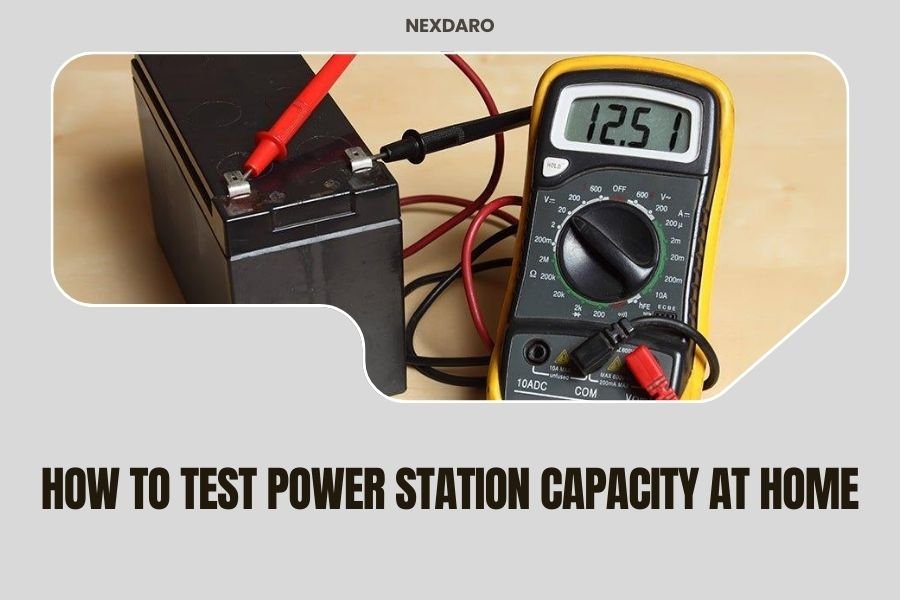
Start with the simplest test. Set your multimeter to DC voltage mode. Most power stations output 12V from their DC ports.
Turn on your power station. Let it sit for 5 minutes. This gives the system time to stabilize after startup.
Taking Voltage Readings
Connect your multimeter probes to the DC output ports. Red probe goes to positive, black to negative. Don’t worry – you can’t hurt anything with this test.
A healthy power station should read close to its rated voltage. For 12V systems, expect 12.2V to 13.8V when fully charged. Below 12V usually means low battery.
What the Numbers Mean
Voltage tells you about charge level, not total capacity. It’s like checking your gas gauge – useful but not the whole story.
| Voltage Reading | Battery Status | Action Needed |
|---|---|---|
| 13.0V+ | Fully charged | Ready to test |
| 12.2V-12.9V | Good charge | Can proceed |
| 11.8V-12.1V | Half charged | Charge first |
| Below 11.8V | Nearly empty | Must charge |
Real-World Load Testing
Choosing Your Test Load
Pick an appliance you know well. A 60-watt LED bulb works great. So does a small fan or radio. The key is knowing exactly how much power it uses.
Avoid complex devices like laptops or microwaves for your first test. Their power draw changes constantly. Keep it simple.
Running the Load Test
Charge your power station completely. Connect your test device and turn everything on. Start your timer.
Check the setup every 30 minutes. Write down the time and voltage reading. This creates a discharge curve – super helpful for understanding your unit’s behavior.
Recording Your Data
Make a simple chart. Time in one column, voltage in another. When the power station shuts off or your device stops working, note the final time.
The math is straightforward. If your 60-watt bulb ran for 10 hours, you got 600 watt-hours of usable capacity. Compare this to the manufacturer’s claim.
Advanced Capacity Testing Methods
Multiple Load Testing
Want to get fancy? Try different load sizes. Test with 25 watts, then 100 watts, then 200 watts. This shows how your power station performs under various conditions.
I found online that most units deliver less capacity under heavy loads. It’s normal but good to know.
USB Port Testing
Don’t forget the USB ports. Many power stations have separate circuits for USB and AC outlets. Test them individually.
Use a USB power meter and charge multiple phones or tablets. Time how long it takes to drain the battery. This test matters if you mainly use USB devices.
Temperature Effects
Heat kills battery performance. If your power station gets hot during testing, let it cool down. High temperatures can give false low readings.
Cold weather does the opposite. Batteries perform worse when cold but return to normal as they warm up.
Interpreting Your Test Results
What’s Normal vs. Concerning
New power stations should deliver 90-95% of rated capacity. Anything above 85% is acceptable. Below 80% suggests a problem.
Age matters too. After 500 charge cycles, expect 10-15% capacity loss. That’s normal battery behavior, not a defect.
Comparing AC vs. DC Performance
AC outlets use an inverter that wastes some power. Expect 10-15% less capacity when using AC compared to DC. This is physics, not a flaw.
DC outputs are more efficient. Use them when possible for longer runtime.
Understanding Efficiency Losses
No power station is 100% efficient. Inverters, voltage converters, and internal circuits all consume energy. Factor this into your expectations.
Troubleshooting Common Issues
Power Station Won’t Hold Charge
This usually means battery degradation. If your unit is over two years old and heavily used, reduced capacity is normal.
Try a full discharge followed by a slow charge. Sometimes this “recalibrates” the battery management system.
Inconsistent Test Results
Temperature, age of charge, and load type all affect results. Test under similar conditions each time for consistency.
If results vary wildly, you might have a failing battery or loose connection.
When to Seek Professional Help
Dramatic capacity loss (more than 50%) or strange behavior like random shutoffs warrant professional inspection. Don’t try to repair lithium batteries yourself.
Maintaining Optimal Power Station Performance
Storage Best Practices
Store your power station at 50-70% charge in a cool, dry place. Full storage charges stress the battery. Empty storage kills it.
Check and top up the charge every 3-4 months during storage.
Regular Testing Schedule
Test capacity every 6 months if you use your power station regularly. Annual testing works for occasional users.
Keep records. Tracking capacity over time helps you plan for replacement before you’re stuck with a dead battery.
Signs It’s Time for Replacement
When capacity drops below 60% of original rating, start shopping for a replacement. You can still use the old unit for light duties, but don’t count on it for emergencies.
Safety Considerations During Testing
Working with Lithium Batteries
Lithium batteries are generally safe but deserve respect. Never disassemble your power station or attempt internal repairs.
If you smell something strange or see swelling, stop testing immediately and move the unit outdoors.
Electrical Safety Basics
Use common sense with electrical testing. Keep water away from your setup. Don’t test with damaged cables or connectors.
If you’re uncomfortable with any part of testing, ask someone experienced to help.
Conclusion
Testing your power station capacity at home is straightforward and valuable. Start with simple voltage checks, then move to real-world load testing with devices you understand. Regular testing helps you know what to expect when you need backup power most.
Remember that some capacity loss is normal as batteries age. The goal isn’t to achieve perfect performance forever, but to understand what you actually have available. This knowledge helps you plan better and avoid unpleasant surprises during power outages or camping trips.
Can I damage my power station by testing it?
Normal capacity testing with appropriate loads won’t harm your power station. Avoid exceeding rated power limits or using damaged test equipment. The built-in safety systems protect against most problems.
How often should I test my power station’s capacity?
Test every 6 months for units you use frequently, or annually for occasional use. More frequent testing helps track performance trends but isn’t necessary unless you notice problems.
Why do my test results vary between attempts?
Temperature, battery age since last charge, and load characteristics all affect results. Test under similar conditions and allow for 5-10% variation between tests on healthy units.
What’s the difference between advertised and usable capacity?
Advertised capacity is the raw battery storage, while usable capacity accounts for conversion losses and safety reserves. Expect 80-90% of advertised capacity in real-world use.
Should I fully discharge my power station during testing?
Complete discharge isn’t necessary for most tests and can stress lithium batteries. Test until the low battery warning activates, then recharge promptly for best battery health.