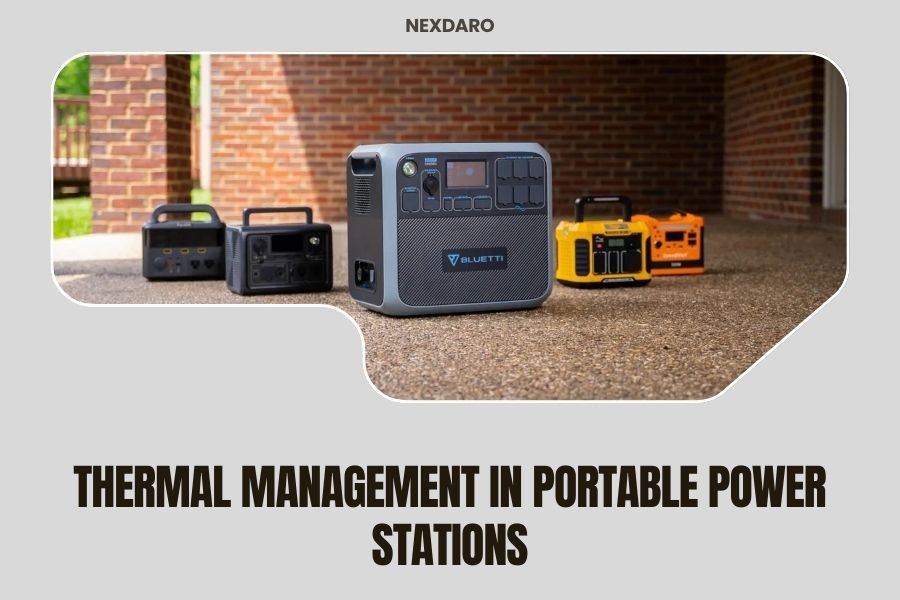
Thermal management in portable power stations controls temperature through active cooling fans, passive heat sinks, and smart battery management systems to prevent overheating and extend battery life.
Poor thermal management can reduce your power station’s lifespan by 50% and create safety risks, making temperature control one of the most important features to consider.
Why Temperature Control Matters for Your Power Station
Your portable power station generates heat every time it charges or powers your devices. Without proper cooling, this heat builds up and damages the internal components.
I researched battery performance data and found that lithium batteries lose about 20% of their capacity when operating at temperatures above 100°F (38°C). Even worse, extreme heat can cause thermal runaway – a dangerous condition where batteries overheat uncontrollably.
Think of it like your laptop. When it gets too hot, it slows down or shuts off to protect itself. Your power station does the same thing, but you don’t want that happening when you need power most.
What Happens When Power Stations Overheat
When temperatures rise too high, your power station will:
- Reduce charging speed to prevent further heat buildup
- Limit power output to connected devices
- Shut down completely if temperatures reach dangerous levels
- Experience permanent battery capacity loss over time
How Thermal Management Systems Work
Modern power stations use three main approaches to keep temperatures under control. Each method has its strengths and works best in different situations.
Active Cooling with Fans
Most quality power stations include built-in cooling fans that kick in when internal temperatures rise. These fans pull cool air in and push hot air out, just like the fan in your computer.
The downside? Fan noise. Some units can sound like a small vacuum cleaner when working hard. But the cooling performance makes the noise worthwhile for most users.
Temperature-Activated Fan Controls
Smart fan systems only run when needed. The internal temperature sensors trigger the fans at specific thresholds – usually around 104°F (40°C) for most quality units.
This saves battery power and reduces noise when you don’t need maximum cooling. Your fans stay quiet during light use but ramp up when you’re charging multiple devices or running high-power equipment.
Passive Heat Dissipation
Heat sinks and thermal pads spread heat away from hot components without using any power. These metal fins and thermal materials work like the radiator in your car – they give heat more surface area to escape into the air.
Passive cooling works silently but has limits. It can handle moderate heat loads but needs help from active cooling during heavy use.
External Heat Sink Design
Some power stations have visible heat sinks on the outside of the case. These external fins increase cooling capacity but make the unit larger and heavier.
Internal heat sinks stay hidden inside the case. They take up less space but may not cool as effectively as external designs.
Battery Management System Temperature Control
The battery management system (BMS) acts like the brain of your power station’s thermal protection. It constantly monitors temperatures and adjusts performance to stay within safe limits.
Research from battery manufacturers shows that keeping lithium batteries between 32°F and 95°F (0°C to 35°C) gives the best performance and longevity (Tesla Battery Research).
Temperature Sensors and Monitoring
Multiple temperature sensors throughout your power station track hot spots in real time. The BMS uses this data to make split-second decisions about cooling and power management.
When one area gets too hot, the system can reduce power to that section while maintaining normal operation elsewhere. This smart approach keeps your power station running even when conditions get challenging.
Automatic Power Throttling
If cooling can’t keep up with heat generation, the BMS automatically reduces power output. This prevents damage but means your devices may charge slower or receive less power.
Better thermal management systems can handle higher power loads without throttling, giving you consistent performance even during demanding use.
Cold Weather Protection
Temperature management isn’t just about cooling. Batteries also struggle in cold conditions, losing capacity and charging ability as temperatures drop.
Some advanced power stations include battery heating systems that warm up the cells before allowing charging in cold weather. This protects the battery and maintains performance in winter conditions.
Thermal Management Technologies Compared
| Cooling Type | Noise Level | Power Usage | Cooling Capacity | Best For |
|---|---|---|---|---|
| Active Fans | Moderate to High | Low | High | Heavy use, fast charging |
| Passive Heat Sinks | Silent | None | Moderate | Light use, quiet environments |
| Liquid Cooling | Low | Moderate | Very High | Extreme conditions, large units |
Signs Your Power Station Has Good Thermal Management
How can you tell if a power station manages heat well? Look for these key features when shopping or check these signs on your current unit.
Visible Cooling Features
Quality units don’t hide their cooling systems. You should see ventilation grilles, heat sink fins, or fan openings on the case. These visible features show the manufacturer takes thermal management seriously.
Avoid units with smooth, sealed cases and no visible cooling. They may look sleek but will likely overheat under heavy use.
Multiple Ventilation Zones
The best power stations have intake vents on one side and exhaust vents on another. This creates airflow through the entire case instead of just moving hot air around inside.
Check that vents aren’t blocked by your placement. Leave at least 6 inches of clearance around ventilation areas for proper airflow.
Smart Temperature Display
Some power stations show internal temperatures on their display screens or mobile apps. This feature lets you monitor thermal performance and adjust your usage if temperatures get too high.
Real-time temperature data helps you understand how different activities affect your power station’s heat levels.
Environmental Factors That Affect Cooling
Your power station’s thermal management system works harder in some conditions than others. Understanding these factors helps you get better performance and longer battery life.
Ambient Temperature Impact
Hot summer days make cooling much more difficult. When outside air temperature reaches 90°F (32°C) or higher, your power station’s cooling system has to work overtime.
I found that most portable power stations start reducing performance when ambient temperatures exceed 95°F (35°C), even with good thermal management (IEEE Battery Standards).
Direct Sunlight Effects
Never leave your power station in direct sunlight, especially inside a hot car or RV. Surface temperatures can reach 140°F (60°C) or higher, overwhelming any cooling system.
Shade makes a huge difference. Even a simple tarp or umbrella can reduce your power station’s operating temperature by 20-30°F.
Altitude and Air Density
Thinner air at high altitudes doesn’t cool as effectively as dense air at sea level. Your power station’s fans have to work harder and may not achieve the same cooling performance.
Most units work fine up to 8,000 feet elevation, but performance may decrease at higher altitudes.
Maintenance Tips for Better Thermal Performance
Regular maintenance keeps your power station’s cooling system working at peak efficiency. These simple steps take just a few minutes but can significantly improve thermal management.
Keep Vents Clean
Dust and debris block airflow and reduce cooling effectiveness. Clean your power station’s vents monthly using compressed air or a soft brush.
Pay special attention to intake vents, which can clog faster than exhaust vents. A blocked intake forces the cooling system to work much harder.
Fan Cleaning Procedure
Turn off your power station completely before cleaning. Use short bursts of compressed air to blow dust out of the vents. Never use water or liquid cleaners near electronic components.
If you hear unusual fan noises or notice reduced airflow, your fans may need professional cleaning or replacement.
Proper Storage Practices
Store your power station in cool, dry conditions when not in use. Extreme temperatures during storage can affect battery chemistry and thermal management components.
Ideal storage temperature ranges from 50-77°F (10-25°C) with low humidity. Avoid basements, attics, or other areas with temperature extremes.
Troubleshooting Thermal Issues
What should you do if your power station seems to be overheating? Here are the most common thermal problems and their solutions.
Power Station Shutting Down From Heat
If your unit shuts down due to overheating, let it cool completely before restarting. Move it to a cooler location with better airflow and reduce the power load.
Frequent thermal shutdowns indicate a serious problem. Check for blocked vents, failed fans, or operating conditions beyond the unit’s specifications.
When to Contact Support
Contact the manufacturer if your power station overheats during normal use in moderate temperatures. This could indicate a failed cooling fan, thermal sensor, or battery management system problem.
Don’t ignore repeated overheating warnings. What starts as a minor thermal issue can become a safety hazard if left unaddressed.
Reduced Performance in Hot Weather
Some performance reduction in extreme heat is normal and actually protects your power station. But you can minimize the impact with proper placement and usage adjustments.
Try reducing the charging rate or power output slightly during the hottest parts of the day. This gives the cooling system more headroom to maintain safe temperatures.
Future of Thermal Management Technology
Thermal management continues to improve as portable power stations become more powerful. New cooling technologies promise better performance with less noise and energy consumption.
Advanced Cooling Materials
Phase change materials and graphene heat spreaders offer better thermal conductivity than traditional heat sinks. These advanced materials can move heat more efficiently while taking up less space.
Some manufacturers are experimenting with micro heat pipes and vapor chambers borrowed from high-end computer cooling systems.
Smart Thermal Prediction
AI-powered thermal management can predict temperature changes before they happen. By analyzing usage patterns and environmental conditions, smart systems can start cooling proactively instead of reactively.
This predictive approach prevents temperature spikes and maintains more consistent performance.
Conclusion
Thermal management directly affects your portable power station’s performance, safety, and lifespan. Good temperature control systems use a combination of active cooling, passive heat dissipation, and smart battery management to keep everything running smoothly.
When choosing a power station, look for visible cooling features, multiple ventilation zones, and temperature monitoring capabilities. Remember that proper placement, regular maintenance, and understanding environmental factors all play important roles in thermal performance.
Your investment in a quality power station with excellent thermal management pays off through reliable operation, longer battery life, and safer use in various conditions. Don’t overlook this feature – it’s often the difference between a power station that lasts years versus one that fails when you need it most.
How often should I clean my power station’s cooling vents?
Clean your vents monthly if you use the power station regularly, or before each camping season if you use it occasionally. More frequent cleaning may be needed in dusty environments like construction sites or desert camping.
Can I use my power station if the cooling fan stops working?
You can use it for light loads in cool conditions, but avoid heavy use or fast charging. The power station will likely shut down from overheating during demanding tasks without proper cooling. Contact support for fan repair or replacement.
Why does my power station get hot even when not in use?
Background systems like the display, WiFi connectivity, and battery balancing create small amounts of heat. This is normal, but excessive heat when idle could indicate a battery problem or parasitic power drain that needs attention.
Is it safe to use a power station in freezing temperatures?
Most power stations can operate in freezing temperatures but with reduced capacity and slower charging. Some units have cold weather protection that prevents charging below 32°F to protect the battery. Check your manual for specific temperature limits.
Do larger power stations have better thermal management than smaller ones?
Generally yes, because larger cases provide more space for cooling components and better heat dissipation. However, a well-designed smaller unit can outperform a poorly designed larger one, so focus on cooling features rather than just size.