Parasitic drain happens when devices or systems continue drawing power from your battery even when turned off, slowly depleting it over time.
You can avoid parasitic drain by unplugging unused devices, turning off standby modes, checking for faulty connections, and using battery disconnect switches when storing equipment long-term.
What Is Parasitic Drain and Why Should You Care?
Picture this: you charge your portable power station, pack it away for a camping trip, and find it completely dead when you need it most. Sound familiar?
Parasitic drain silently steals your battery’s energy. It’s like leaving a tiny light on in your basement – you don’t notice it, but your electric bill does. With batteries, this slow leak can ruin your outdoor adventures and shorten your equipment’s life.
I found that most battery failures aren’t from normal use. They’re from this sneaky power thief that works 24/7, even when you think everything is off.
Common Causes of Parasitic Drain
Let’s identify the usual suspects. Knowing what causes parasitic drain helps you stop it before it starts.
Electronic Devices on Standby Mode
Your devices might look off, but many stay partially awake. Think of them as power vampires – they sleep, but they still need to eat.
Portable radios, GPS units, and even some LED lights keep small circuits active. These circuits maintain memory settings or wait for remote signals.
Faulty Wiring and Loose Connections
Bad wiring acts like a slow leak in your water pipe. Current finds ways to flow where it shouldn’t go.
Corrosion, damaged insulation, or loose terminals create these unwanted paths. The drain might be tiny, but it never stops.
Clock and Memory Functions
Many devices need power to remember your settings. Your radio keeps its presets. Your inverter remembers its last configuration.
These memory functions are helpful, but they nibble at your battery constantly. It’s a trade-off between convenience and power conservation.
Indicator Lights and Displays
Those little LED lights that show your device is plugged in? They’re tiny energy drains that add up over time.
Digital displays on chargers, inverters, and other equipment stay lit even when not actively charging or converting power.
How to Identify Parasitic Drain
You can’t fight what you can’t see. Let’s learn how to catch these power thieves in the act.
Signs Your Battery Has Parasitic Drain
Your battery gives you clues when something’s wrong. Watch for these warning signs:
- Battery dies faster than expected between uses
- Devices won’t start after sitting unused for days
- Battery feels warm when it should be cool
- Charging takes longer than normal
Simple Testing Methods
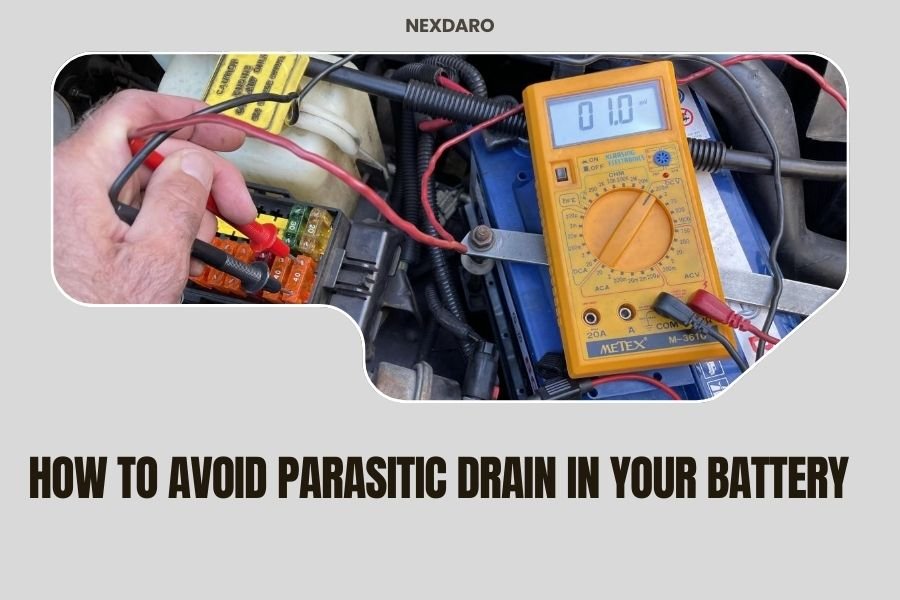
You don’t need fancy equipment to check for parasitic drain. A basic multimeter works great.
First, disconnect your battery’s positive terminal. Put your multimeter between the terminal and cable. Set it to measure DC current. Any reading above 50 milliamps suggests a problem.
Research shows that normal parasitic draw should stay under 25 milliamps for most systems (Automotive Service Excellence). Higher readings mean you’ve got a hungry circuit somewhere.
The Process of Elimination Method
Start by unplugging devices one by one. Watch your multimeter reading after each disconnection.
When the current drops significantly, you’ve found your culprit. It’s like playing detective – methodical elimination leads to answers.
Prevention Strategies That Actually Work
Prevention beats fixing problems later. Here are proven ways to keep parasitic drain from stealing your power.
Unplug Devices When Not in Use
This sounds obvious, but it’s the most effective solution. Completely disconnecting devices stops all drain immediately.
Make unplugging part of your routine. When you finish using something, disconnect it. Your future self will thank you when your battery still has juice.
Use Battery Disconnect Switches
Battery disconnect switches are like master power buttons for your entire system. Flip one switch, and everything stops drawing power.
I found these switches especially useful for RVs, boats, and emergency power setups. They’re cheap insurance against dead batteries.
Choose Equipment with True Off Modes
Some devices turn completely off when you flip their switch. Others just go to sleep. Look for equipment that draws zero power when switched off.
Read product specifications carefully. Good manufacturers list standby power consumption. Zero watts in standby mode is what you want.
Regular Maintenance and Inspection
Check your connections monthly. Look for corrosion, loose wires, or damaged insulation.
Clean battery terminals with baking soda and water. Tight, clean connections prevent many parasitic drain problems before they start.
Device-Specific Solutions
Different devices need different approaches. Let’s tackle the most common power drains one by one.
Portable Power Stations
Modern power stations often have displays and USB ports that stay active. Some models draw 5-10 watts just sitting there.
Turn off AC inverters completely when not needed. Disable USB ports if your model allows it. Use the main power button instead of relying on auto-sleep modes.
Inverters and Converters
These devices can be major power drains. Even good inverters might draw 0.5-2 watts in standby mode.
Install a separate switch for your inverter. Don’t rely on its internal standby mode for long-term storage. Complete disconnection is your best bet.
Charging Cables and Adapters
Wall chargers plugged into your power station keep drawing current even with nothing connected to charge.
Unplug chargers when you’re done with them. Those little transformers inside stay energized and warm as long as they’re connected.
Smart Device Chargers
Modern chargers with LED indicators or smart features draw more standby power than simple ones.
Consider using basic chargers for emergency kits and smart chargers only when you need their extra features.
USB Cables and Ports
USB ports on power stations often stay live even when the main unit seems off. They’re ready to detect when you plug something in.
Some power stations let you disable USB ports completely. Check your manual for power management options.
Storage Best Practices
Proper storage prevents parasitic drain during long periods of non-use.
Preparing Batteries for Long-Term Storage
Charge your battery to about 50-60% before storage. Full charges or empty batteries both suffer more from parasitic drain effects.
Disconnect everything possible. Even small drains become big problems over months of storage.
Environmental Considerations
Store batteries in cool, dry places. Heat speeds up chemical reactions that worsen parasitic drain effects.
Extreme cold isn’t great either, but heat does more damage to stored batteries. A basement or garage usually works better than an attic.
Periodic Maintenance During Storage
Check stored batteries every 2-3 months. Top off the charge if needed.
This maintenance prevents deep discharge, which can permanently damage some battery types. Set a calendar reminder so you don’t forget.
Advanced Troubleshooting Techniques
Sometimes simple solutions don’t work. Here’s how to dig deeper into stubborn parasitic drain problems.
Using Multimeters Effectively
Set your multimeter to the 10-amp DC setting first. This prevents blowing fuses from high initial current.
After connecting, switch to lower amp settings for more accurate readings. Most parasitic drains measure in milliamps, not full amps.
Circuit-by-Circuit Testing
Complex systems need systematic testing. Remove fuses one at a time while watching your current measurement.
When current drops, you’ve found the problem circuit. Then test individual devices on that circuit to pinpoint the exact cause.
Documenting Your Findings
Keep notes about what you find. Write down which circuits draw how much current.
This documentation helps with future problems and can guide others working on similar systems.
When to Seek Professional Help
Some parasitic drain problems need expert attention. Don’t risk damaging expensive equipment or creating safety hazards.
Complex Electrical Systems
RV electrical systems, boat wiring, and whole-house backup systems can be complex. Multiple batteries, charge controllers, and automated systems make troubleshooting tricky.
Professional technicians have specialized tools and experience with these complex setups.
Safety Concerns
High-voltage systems or large battery banks can be dangerous. If you’re not comfortable working with electrical systems, get help.
A shock from a 12-volt battery probably won’t hurt you. A 400-volt EV battery definitely will.
Cost-Benefit Analysis of Prevention
Prevention costs money upfront but saves more in the long run. Let’s look at the numbers.
| Prevention Method | Initial Cost | Battery Life Extension | Annual Savings |
|---|---|---|---|
| Battery disconnect switch | $15-30 | 2-3 years | $50-150 |
| Smart power strips | $20-40 | 1-2 years | $30-100 |
| Regular maintenance | $0-20 | 3-5 years | $100-300 |
Good batteries aren’t cheap. Extending their life by just one year typically pays for all your prevention efforts.
Conclusion
Parasitic drain doesn’t have to ruin your batteries or your adventures. Simple prevention steps make a huge difference in battery life and reliability.
Start with the basics: unplug devices when not in use, install disconnect switches for long-term storage, and check your connections regularly. These small habits prevent most parasitic drain problems.
Remember, your battery is like a savings account. Parasitic drain makes constant withdrawals without your permission. Stop the withdrawals, and your power stays available when you need it most.
Don’t wait for problems to develop. Take action now to protect your investment and ensure reliable power for years to come.
What’s the difference between parasitic drain and normal battery self-discharge?
Normal self-discharge happens inside the battery due to chemical reactions, typically losing 1-3% per month. Parasitic drain comes from external devices drawing power, often much faster than natural self-discharge rates.
Can parasitic drain permanently damage my battery?
Yes, repeated deep discharge from parasitic drain can permanently reduce battery capacity, especially in lead-acid and some lithium batteries. Prevention saves both power and battery lifespan.
How often should I check for parasitic drain?
Check monthly during regular use, and always before long-term storage. If you notice faster-than-normal power loss, test immediately rather than waiting for your regular schedule.
Are some battery types more susceptible to parasitic drain damage?
Lead-acid batteries suffer the most from deep discharge caused by parasitic drain. Lithium batteries handle deep discharge better but still lose capacity over time. AGM batteries fall somewhere in between.
Can I use a solar panel to offset parasitic drain?
Small solar panels can offset minor parasitic drain, but they’re not reliable in all weather conditions. It’s better to eliminate the drain source rather than try to constantly replace lost power.