6 Best Anker Desktop Charging Stations (October 2026)
The best Anker desktop charging stations include the Anker 525 Charging Station for a tidy everyday desk, the Kioson 12-in-1 Charging Station USB C Power for many devices at one desk, and the Anker Nano Charging Station for retractable USB-C cables.
On this page (10 sections)
- Which Anker desktop charging station fits your desk?
- 1. Anker 525 Charging Station: Best for a tidy everyday desk
- 2. Kioson 12-in-1 Charging Station USB C Power: Best for many devices at one desk
- 3. Anker Nano Charging Station: Best for retractable USB-C cables
- 4. Anker Prime Charging Station: Best for a slim desk footprint
- 5. Anker Prime Charging Station: Best for high USB-C port count
- 6. Kioson 200W Charging Station: Best for a flat-plug setup
- What should you compare before choosing an Anker desktop power station?
- Is a desktop charging station the same as a portable power station?
- Which Anker desktop charging station should you choose?
The Anker 525 Charging Station is the best Anker desktop power station for most desks, with 3 AC outlets, 4 USB ports and front-facing USB connections alongside rear AC outlets. For more USB-C ports or a slimmer profile, the Anker Prime models offer different ways to arrange a desk charging setup.
These are wall-powered charging stations, not battery power stations. Compare the ports you need, how power is shared and where cables will run before choosing one.
Our picks at a glance
-
1

-
2
 Best for many devices at one desk
Kioson 12-in-1 Charging Station USB C Power
9.5/10 our score
See it on Amazon -
3

Which Anker desktop charging station fits your desk?
The Anker 525 is the easiest starting point for everyday desk charging, while the Nano and Prime stations suit different needs for retractable cables, USB-C count or a slim shape. The two Kioson options add more total ports for setups with many devices.
We compared the port mix, stated USB output, cable layout and desk-oriented features. Our score weighs specs and features against what you're shopping for, especially accessible connections and a setup that can keep cords manageable.
For more on USB-C charging standards and how they affect power delivery, read our USB-C PD Explained: Fast Charging for Power Stations.
| Product | Best for | Ports | USB output | Cable layout | Our score |
|---|---|---|---|---|---|
| Anker 525 Charging Station | a tidy everyday desk | 3 AC, 2 USB-C, 2 USB-A | 65W shared | USB ports front, AC outlets back | 9.7 |
| Kioson 12-in-1 Charging Station USB C Power | many devices at one desk | 4 AC, 4 USB-C, 4 USB-A | 200W shared | 5 ft cord with flat plug | 9.5 |
| Anker Nano Charging Station | retractable USB-C cables | 3 AC, 3 USB-C, 1 USB-A | Two built-in USB-C cables extend up to 2.3 ft | 9.4 | |
| Anker Prime Charging Station | a slim desk footprint | 2 AC, 2 USB-C, 2 USB-A | 5 ft detachable cord, pop-up outlet | 9.4 | |
| Anker Prime Charging Station | high USB-C port count | 2 AC, 4 USB-C, 2 USB-A | 5 ft detachable extension cord, pop-up outlet | 9.2 | |
| Kioson 200W Charging Station | a flat-plug setup | 4 AC, 4 USB-C, 4 USB-A | 200W shared | 5 ft cord with 0.7 in flat plug | 8.7 |
1. Anker 525 Charging Station: Best for a tidy everyday desk
The Anker 525 is the best fit when you want USB ports within reach and AC outlets behind the station. It has 3 AC outlets, 2 USB-C ports and 2 USB-A ports, with 65W shared across the USB ports.
Anker 525 Charging Station: Best for a tidy everyday desk
- 3 AC outlets
- 2 USB-C and 2 USB-A ports
- USB ports share 65W
- Back-positioned AC outlets
Front-facing USB ports keep frequently used charging connections close, while rear AC outlets help route appliance cables away from the front of the desk.
Pros
- Rear AC outlets help reduce desk cable clutter
- Four front-facing USB ports
- 3 AC outlets for other devices
Cons
- USB-C output is shared across the ports
- No retractable USB-C cables
Its layout is the main desk-friendly detail: the USB ports face forward for easy access, and the AC outlets sit at the back to help keep power cables from crossing the front of your workspace. That can be useful when a monitor, lamp or other AC device stays plugged in.
The two USB-C ports are described as 67W ports, but they share 65W total. If you connect more than one device, don't assume each will receive the full single-port output.
This station suits a desk with a laptop, phone and a few plugged-in accessories. Its 7-in-1 setup gives you a mix of USB and AC connections without taking the approach of a much larger 12-port hub.
Choose it for a tidy mix of front-facing USB access and rear AC connections. If charging a laptop is a priority, compare your laptop's needs with the station's shared USB-C output and read our [Charging a Laptop: DC vs.
AC Efficiency Guide](/charge-laptop-dc-vs-ac-efficiency/).
2. Kioson 12-in-1 Charging Station USB C Power: Best for many devices at one desk
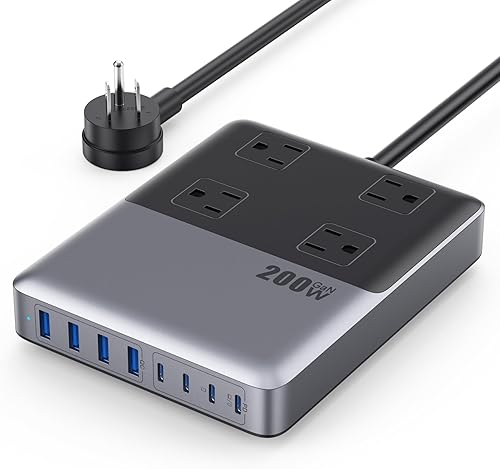
The Kioson 12-in-1 is the best fit here when you need many connections in one place. It has 4 AC outlets and 8 USB ports, split into 4 USB-C and 4 USB-A, with a stated 200W shared across the USB ports.
Kioson 12-in-1 Charging Station USB C Power: Best for many devices at one desk
- 4 AC outlets
- 4 USB-C and 4 USB-A ports
- 200W shared across USB ports
- 5 ft extension cord
A mix of 4 AC outlets and 8 USB ports supports a crowded desk with a laptop, phones and accessories. The 200W figure is shared across the USB ports.
Pros
- 12 total AC and USB connections
- 5 ft extension cord
- Flat plug
Cons
- USB output is shared across connected devices
- Larger port count may be more than a simple desk needs
The 5 ft extension cord can help place the station on a desk rather than directly at the wall. Its flat plug is 0.7 in, which may be useful where a standard plug would stick out into furniture or a walkway.
The 65W USB-C1 port is the stated fast-charging connection for a laptop. Total USB power is shared, so the number of connected devices and their charging needs matter when you use several ports at once.
This is a practical choice for a household desk or a shared work area with computers, phones and small accessories. Four AC outlets add room for devices that use their own power plugs, while eight USB ports cover a broader mix of USB-charged gear.
3. Anker Nano Charging Station: Best for retractable USB-C cables
The Anker Nano is the best fit if you want short, built-in USB-C leads ready at the desk. It includes two retractable USB-C cables, 3 AC outlets, 3 USB-C ports and 1 USB-A port.
Anker Nano Charging Station: Best for retractable USB-C cables
- 3 AC outlets
- 3 USB-C and 1 USB-A port
- Two built-in retractable USB-C cables
- 100W max from a USB-C port used alone
The two built-in USB-C cables can reduce the number of loose charging leads on a desk. Each USB-C port can deliver up to 100W when used alone, with power shared when multiple devices are connected.
Pros
- Two retractable USB-C cables
- LCD display shows charging status
- 3 AC outlets
Cons
- Built-in cables extend up to 2.3 ft
- USB-C power is shared when multiple devices connect
Each USB-C port can provide up to 100W when used alone, with power shared across ports when multiple devices are connected. The station also has an LCD display for real-time charging status.
The built-in cables extend up to 2.3 ft, so plan to place the unit close to the devices you charge. The power cord itself is not retractable.
An adhesive pad is included for extra stability. This design may suit a laptop and phone that stay within easy reach, especially if you prefer not to keep separate USB-C cables stretched across the desk.
For estimates of how long different devices may take to charge, see our guide to USB-C Charging Times for Power Stations.
4. Anker Prime Charging Station: Best for a slim desk footprint
The Anker Prime 6-in-1 is the best fit if a slim station with a display matters more than having many ports. Its stacked design is 0.7 in thick, with 2 AC outlets, 2 USB-C ports and 2 USB-A ports.
Anker Prime Charging Station: Best for a slim desk footprint
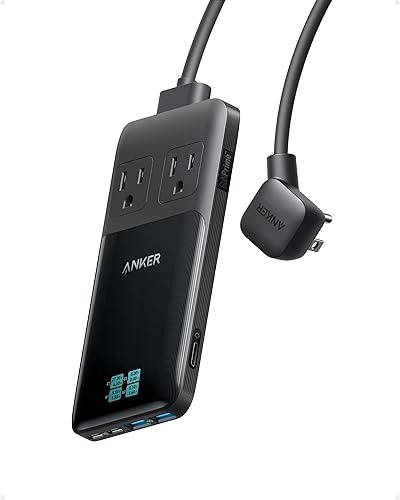
- 2 AC outlets
- 2 USB-C and 2 USB-A ports
- Smart display with port readings
- 0.7 in thick
Its stacked design is 0.7 in thick, and the display can show port power readings. One USB-C port provides up to 140W when used alone; output is distributed when more ports are in use.
Pros
- Slim 0.7 in profile
- Display shows port power readings
- Detachable 5 ft cord
Cons
- 2 AC outlets
- No surge protection
A single USB-C port can deliver up to 140W, with power distributed when multiple ports are in use. The display can show individual port power readings, as well as voltage and current details.
The 5 ft detachable cord gives you some flexibility to place the station away from the wall outlet. Its pop-up outlet adds an AC connection when needed, while keeping the main unit's profile slim.
This model has no surge protection. It may suit a desk where a slim shape and on-device power readings are useful, but plan for surge protection separately if your setup requires it.
5. Anker Prime Charging Station: Best for high USB-C port count
The Anker Prime 240W model is the best fit for desks with several USB-C devices that need to remain connected. It combines 4 USB-C ports, 2 USB-A ports and 2 AC outlets in an AC-powered station.
Anker Prime Charging Station: Best for high USB-C port count
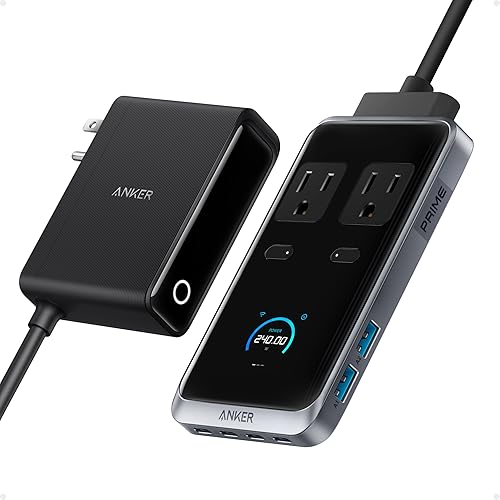
- 2 AC outlets
- 4 USB-C and 2 USB-A ports
- 240W charging station
- Up to 140W from a USB-C port
Four USB-C ports make this a fit for desks with several USB-C devices. It plugs into a wall outlet and has no built-in battery.
Pros
- 4 USB-C ports
- 2 AC outlets
- Pop-up outlet
Cons
- Requires a wall outlet to operate
- Not a portable battery
The station is rated at 240W, and each USB-C port can provide up to 140W. Actual charging depends on the connected devices and how power is distributed across the station.
This is not a battery or power bank. It must be plugged into a wall outlet to operate, so it belongs in a fixed desk setup rather than an emergency kit or travel bag.
A pop-up outlet gives you an AC connection at the station, and the cord is detachable. Choose this model when USB-C port count is the main need and you have a suitable wall outlet nearby.
6. Kioson 200W Charging Station: Best for a flat-plug setup
The Kioson 200W Charging Station is the best fit when a flat plug and a long extension cord help with desk placement. It has 4 AC outlets and 8 USB ports, including 4 USB-C and 4 USB-A.
Kioson 200W Charging Station: Best for a flat-plug setup

- 4 AC outlets
- 4 USB-C and 4 USB-A ports
- 200W shared across USB ports
- 5 ft extension cord with flat plug
The flat plug and 5 ft cord can help place the charging station where a bulky plug may be awkward. It provides 12 total AC and USB connections.
Pros
- 12 total AC and USB connections
- Flat plug and 5 ft cord
- 65W USB-C1 port
Cons
- USB output is shared across devices
- Desk placement still depends on cord reach
Its 0.7 in flat plug is paired with a 5 ft cord. That combination can make it easier to position the charging station along the desk or another nearby surface, though the cord still needs a clear path to the outlet.
The USB ports share 200W total, and the USB-C1 port is rated at 65W. Check which devices need the highest output before deciding what to connect to that port.
This option overlaps with the other Kioson 12-in-1 station in its port count and total USB output. Compare the cord and plug arrangement with your room before picking between them.
If you'll power a station from another portable charger, read Can You Charge a Power Station with a Power Bank?. To compare Anker models made for portable backup power, see our Top 7 Best Anker Portable Power Station guide.
What should you compare before choosing an Anker desktop power station?
Start with the port mix and the devices that stay on your desk. A station with many USB ports may be a better match for phones and accessories, while AC outlets matter for equipment with standard plugs.
Next, check how output is shared. Maximum wattage can apply to one port or the whole station, so look for the stated limit when several devices charge at once.
Cable placement can matter as much as port count. Rear AC outlets, retractable USB-C cables, a detachable cord or a flat plug each solve a different desk-layout problem.
Is a desktop charging station the same as a portable power station?
No. These desktop charging stations need wall power, while a portable power station stores energy in a battery for use away from an outlet.
For compatible adapters, see our portable power station charger guide.
If you want to keep using a charging station while its power source is charging, first confirm that the battery system supports that use. Our guide explains Can You Use a Power Station While it is Charging?.
Which Anker desktop charging station should you choose?
Choose the Anker 525 for a straightforward desk setup with front-facing USB ports and rear AC outlets. Pick the Anker Nano if its built-in retractable USB-C cables match your device placement.
For a slim profile, consider the Anker Prime 6-in-1; for more USB-C ports, choose the Anker Prime 240W. If you need many total connections or a flat plug, compare the two Kioson 12-in-1 options by their cord placement and how you'll use their shared USB output.
Our top 3 picks at a glance
-
1
-
2
Best for many devices at one desk
Kioson 12-in-1 Charging Station USB C Power
9.5/10 our score
See it on Amazon -
3
Frequently asked questions
Is an Anker desktop power station a battery?
No. These desktop charging stations are AC-powered accessories that need a wall outlet.
The Anker Prime 240W model explicitly has no built-in battery and cannot work as a power bank.
For stored energy you can use away from an outlet, compare portable power stations instead.
How many USB-C ports do I need on a desktop charging station?
Count the USB-C devices you want to keep connected at once, then leave a port free if you often add a phone or tablet. The Anker Nano has 3 USB-C ports, while the Anker Prime 240W model has 4.
Check how each station shares power across ports before relying on a high output for several devices at once.
Does a higher wattage mean every device charges at that speed?
No. A station's maximum output doesn't mean every connected device receives that amount.
The Anker 525 shares 65W across its USB-C ports, and the Anker Nano gives up to 100W from a USB-C port when used alone.
Your device and cable also affect charging speed.
How can I reduce cable clutter around a charging station?
Choose a layout that puts the ports you use most within reach and lets longer cords run behind the desk. The Anker 525 places USB ports at the front and AC outlets at the back, while the Anker Nano has two built-in retractable USB-C cables.
Measure the cord path to your outlet before settling on a location.