6 Best Anker Power Stations for a Desk (October 2026)
The best Anker desk charging stations include the Anker 525 Charging Station for a tidy everyday desk, the Kioson 12-in-1 Charging Station USB C Power for charging many devices, and the Anker Nano Charging Station for built-in cable access.
On this page (6 sections)
The Anker 525 Charging Station is the best Anker power station for a desk for most setups, with rear AC outlets and accessible front USB ports. Choose the Nano if retractable USB-C cables would reduce desk clutter, or the Prime 240W model if you need more USB-C charging capacity.
These are AC-powered charging stations, not portable power stations with batteries. They organize wall power for a laptop, phone, monitor and other desk devices, but they won't keep equipment running during an outage.
If you need to estimate laptop power needs first, see our Power Needs for Digital Nomads: Remote Work Guide. For battery-powered options, compare our Best Portable Power Station For Laptop Charging guide.
Our picks at a glance
-
1

-
2
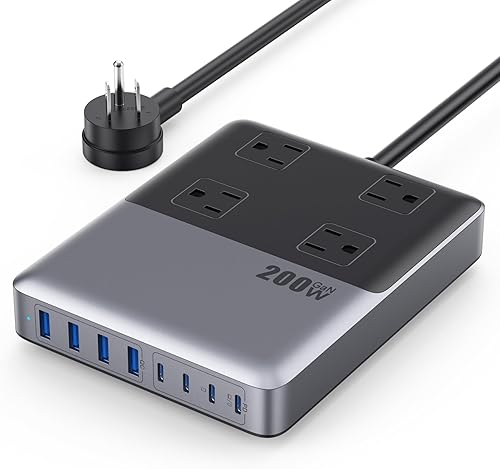 Best for charging many devices
Kioson 12-in-1 Charging Station USB C Power
9.5/10 our score
See it on Amazon -
3

How we chose an Anker power station for a desk
The best Anker power station for a desk needs to match your device mix, cable layout and available space. We compared the listed outlet layouts, USB ports, output information, cord details and desk-focused features.
A higher port count can reduce the need for separate chargers, but shared output matters if you charge a laptop and phone at once. We also considered whether cables stay easy to reach and whether the station's profile fits a compact work area.
The Kioson option is included as a non-Anker alternative because its 12-in-1 layout offers many simultaneous connections. If you want to compare more Anker formats, see our guide to Top 7 Best Anker Portable Power Station and our comparison of What Is the Difference Between Bluetti and Anker Power Stations?.
| Product | Best for | AC outlets | USB ports | USB-C output | Our score |
|---|---|---|---|---|---|
| Anker 525 Charging Station | a tidy everyday desk | 3 | 4 | 65W shared | 9.7 |
| Kioson 12-in-1 Charging Station USB C Power | charging many devices | 4 | 8 | 9.5 | |
| Anker Nano Charging Station | built-in cable access | 3 | 4 | 9.4 | |
| Anker Prime Charging Station | a slim charging strip | 2 | 4 | 9.4 | |
| Anker Flat Plug Power Strip | extra AC outlets | 6 per strip | 4 per strip | 9.3 | |
| Anker Prime Charging Station | high USB-C output | 2 | 6 | 9.2 |
Which desk charging station fits your setup?
The Anker 525 balances AC outlets and USB ports for a typical home office, while the other choices serve specific cable, space or port-count needs. Match the station to the gear you plug in every day.
Anker 525 Charging Station: Best for a tidy everyday desk
- 3 AC outlets
- 2 USB-C and 2 USB-A ports
- 65W shared USB-C output
- Rear AC outlets and front-facing ports
Rear AC outlets and front-facing USB ports help keep a desk setup organized. It offers 3 AC outlets, 2 USB-C ports and 2 USB-A ports.
Pros
- AC plugs sit at the back
- Front-facing USB ports
- Three AC outlets
Cons
- USB-C ports share 65W
- Not a battery-powered station
The Anker 525 keeps its 3 AC outlets at the back and puts its 4 USB ports at the front. That split can help route laptop and monitor power cables away from your hands while keeping phone and tablet connections within reach.
Its USB layout includes 2 USB-C and 2 USB-A ports. The two USB-C ports share up to 65W, so check your laptop's charging requirement and consider what else will be connected at the same time.
The station also includes ActiveShield 2.0, which Anker describes as real-time temperature control and adaptive power management. Its 5 ft extension cord gives you some flexibility in positioning it on a desk.
Choose this for a straightforward desk setup with a mix of AC-powered gear and USB devices. For a laptop-specific comparison, see best Anker power stations for laptops.
Kioson 12-in-1 Charging Station USB C Power: Best for charging many devices
- 4 AC outlets
- 4 USB-C and 4 USB-A ports
- 200W shared USB power
- 5 ft cord
A high port count gives one desk station room for AC plugs and several USB devices. Its 8 USB ports share 200W.
Pros
- 12 total outlets and ports
- Four USB-C ports
- Five-foot cord
Cons
- USB power is shared
- Brand is Kioson, not Anker
Kioson's 12-in-1 station is the port-count choice for a desk shared by several devices. It has 4 AC outlets plus 8 USB ports, split between 4 USB-C and 4 USB-A, with the USB ports sharing 200W.
One USB-C port is rated for up to 65W, which may suit a laptop that accepts that charging level. The total output is shared across devices, so don't assume every connected USB device receives the maximum at once.
Its 5 ft cord and flat plug can help when the wall outlet is behind a desk or furniture. This is a Kioson alternative rather than an Anker-branded pick, so choose it when the larger port selection matters more than keeping to Anker.
Anker Nano Charging Station: Best for built-in cable access
- 3 AC outlets
- 3 USB-C and 1 USB-A port
- Two retractable USB-C cables
- LCD charging display
Two built-in retractable USB-C cables keep charging leads close at hand. The USB-C ports share power when multiple devices are connected.
Pros
- Two retractable USB-C cables
- LCD charging display
- Three AC outlets
Cons
- Cables extend up to 2.3 ft
- USB-C power is shared across connections
The Anker Nano suits a desk where you often plug and unplug a phone or laptop. Its two retractable USB-C cables extend up to 2.3 ft, so keep the station within easy reach of devices rather than expecting the leads to span a wide desk.
It also has 3 AC outlets, another USB-C port and a USB-A port. Each USB-C port can deliver up to 100W when used alone, with power shared when multiple devices are connected.
An LCD display shows real-time charging status. The station measures 4.76 x 2.86 x 2.09 in, and an adhesive pad is included for added stability.
Anker Prime Charging Station: Best for a slim charging strip
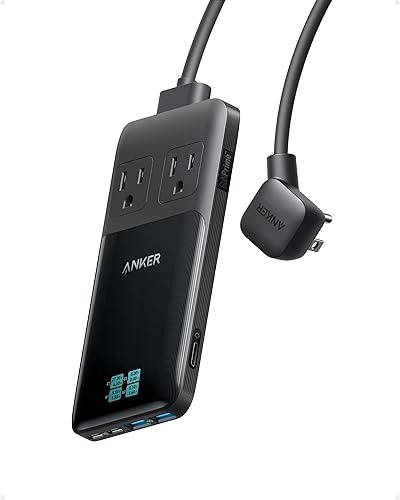
- 2 AC outlets
- 2 USB-C and 2 USB-A ports
- Smart display
- 0.7 in thick
The slim, stacked design and pop-up outlet suit a desk where a low profile matters. Its display shows port power readings and voltage or current details.
Pros
- Slim 0.7 in profile
- Display shows charging details
- Detachable 5 ft cord
Cons
- Only two AC outlets
- No surge protection
This Anker Prime station fits a desk where a slim profile and charging information matter. It measures 0.7 in thick and has a pop-up outlet, 2 AC outlets, 2 USB-C ports and 2 USB-A ports.
Its smart display can show port power readings, voltage and current details. Anker says a single USB-C port can deliver up to 140W, while power is distributed when multiple ports are used.
The 5 ft cord is detachable, which can make storage or desk rearrangement easier. Note that this model does not have surge protection, so buyers who need that feature should choose a different power strip.
Anker Flat Plug Power Strip: Best for extra AC outlets

- 6 AC outlets
- 2 USB-C and 2 USB-A ports
- Flat plug
- 10 ft extension cord
Six AC outlets and four USB ports give a desk more connection points, while the flat plug and longer cord support flexible placement.
Pros
- Six AC outlets per strip
- Ten-foot cord
- Flat plug design
Cons
- USB-C output is 20W
- Pack contains two strips
The Anker Flat Plug Power Strip is a practical fit when AC outlets are the priority. Each strip has 6 AC outlets, 2 USB-C ports and 2 USB-A ports, plus a 10 ft extension cord.
Its flat plug can fit behind furniture where a standard plug sticks out farther. The stated 20W USB-C output is more modest than the Prime stations, so this is a better match for phones and smaller devices than a desk centered on high-demand USB-C laptop charging.
The package contains two strips. Plan where both will go before choosing this option, and keep the strips' combined placement and cords tidy around your workspace.
Anker Prime Charging Station: Best for high USB-C output
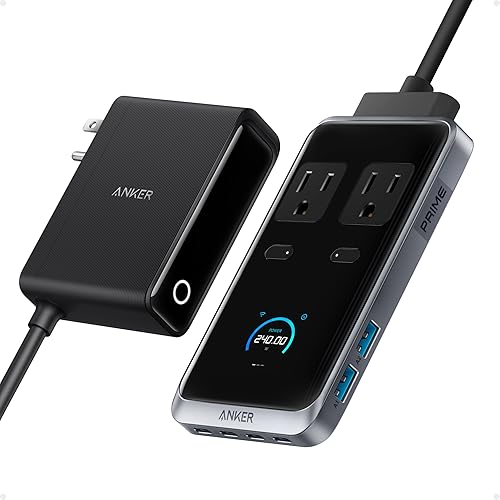
- 2 AC outlets
- 4 USB-C and 2 USB-A ports
- 240W total charging power
- 140W maximum per USB-C port
Four USB-C ports and a stated 240W total suit a desk with several higher-demand devices. It must stay plugged into a wall outlet.
Pros
- Four USB-C ports
- 140W maximum per USB-C port
- Pop-up outlet
Cons
- Only two AC outlets
- Requires wall power
The 8-in-1 Anker Prime station is the strongest match here for a desk with several USB-C devices. It combines 4 USB-C ports, 2 USB-A ports and 2 AC outlets, with a stated 240W total charging power.
Anker rates each USB-C port for up to 140W, but actual power is shared when multiple devices are connected. The station must remain plugged into a wall outlet and has no built-in battery.
Its compact body measures 5.43 x 3.07 x 0.71 in, with an included adapter. Choose it when USB-C charging capacity matters more than having a large number of AC outlets.
What should you check before choosing a desk power station?
Check your laptop's charging requirement, the number of devices you connect, and where the station can sit. These details help you avoid a station that has the right number of ports but the wrong layout for your desk.
Start with your laptop charger. Compare its power requirement with the station's USB-C output, and remember that multiport use can divide available power among connected devices.
Next, count wall-powered equipment such as monitors and lamps separately from USB devices. The Anker 525 and Flat Plug offer more AC outlets than the Anker Prime models in this group.
Finally, think about access and reach. A station with front ports suits frequent plug-ins, while a longer cord helps when the wall outlet is farther away.
For a desk computer that needs power through an outage, read our Best Portable Power Station For Computer UPS guide.
Are desk charging stations portable power stations?
No, these desk charging stations are not battery-powered portable power stations. For battery backup sized around a fridge, compare BLUETTI power stations for refrigerators.
They need a wall outlet to operate, so they won't provide electricity during an outage or at a campsite without another power source.
The phrase “power station” can describe both battery units and desktop chargers, which makes it easy to confuse the two. For laptop charging away from a wall outlet, start with a battery-powered unit sized for your runtime needs.
If you're comparing Anker battery models, our Anker laptop power station guide focuses on laptop charging needs. Check the specific unit's battery capacity, outputs and charging limits before choosing it for a work session away from mains power.
How do you keep a desk charging setup tidy?
Put the station where its most-used ports are easy to reach, then route less-used AC cables behind the desk. A model with rear outlets, such as the Anker 525, can separate bulky plugs from front-facing USB connections.
Measure the available surface and cable distance before placing a station. Retractable cables on the Nano are short by design, while the Flat Plug strip has a longer 10 ft extension cord.
Avoid stacking chargers or blocking ventilation around equipment. Keep cords clear of walkways and moving desk parts, and check that plugs fit without pressing against a wall or adjacent furniture.
Which Anker desk power station should you choose?
Choose the Anker 525 for a balanced home-office layout with rear AC outlets and front USB ports. Pick the Nano for short retractable USB-C cables, the slim Prime for a low-profile station with a display, or the Prime 240W for more USB-C capacity.
If you mainly need additional AC sockets, the Flat Plug Power Strip offers 6 AC outlets per strip. If you need to charge many devices from one compact station, consider the Kioson 12-in-1 and account for its shared USB output.
For battery-powered work away from a wall outlet, compare Best Portable Power Station For Laptop Charging and Top 7 Best Anker Portable Power Station.
Our score weighs specs, features and buyer feedback against what you're shopping for.
Our top 3 picks at a glance
-
1
-
2
Best for charging many devices
Kioson 12-in-1 Charging Station USB C Power
9.5/10 our score
See it on Amazon -
3
Frequently asked questions
Is an Anker power station for a desk a battery backup?
No. These desk charging stations plug into a wall outlet and distribute power to connected devices.
They do not provide backup power from a built-in battery.
For outage protection, choose equipment designed to supply battery power, and check the connected computer's power needs.
Which Anker desk charging station has retractable cables?
The Anker Nano Charging Station has two built-in retractable USB-C cables that extend up to 2.3 ft. Its USB-C ports share power when more than one device is connected.
Measure the distance from the station to your laptop before relying on the built-in leads.
Can one desk station charge a laptop and phone at the same time?
Yes, if the station has suitable ports and enough shared output for both devices. The Anker 525 has USB-C and USB-A ports, while the Prime models offer multiple USB-C connections.
Check your laptop's charging requirement and how output is shared across ports.
How do I keep desk charging cables organized?
Choose a station with ports where you can reach them and place it near the devices you charge most. Rear AC outlets can route larger power cables behind the station, while front-facing USB ports stay accessible.
Measure the available surface and cord reach before settling on a location.


