9 Best Power Stations for Starlink (November 2026)
The best portable power stations for Starlink include the Jackery Explorer 300 Portable Power Station for AC-powered Starlink setups, the Anker SOLIX C300 DC Portable Power Station for DC and USB-C gear, and the BLUETTI Elite 10 Mini Portable Power Station for a light backup kit.
On this page (7 sections)
The best power station for Starlink depends on the dish, its power draw and your planned runtime. The Jackery Explorer 300 is a flexible AC option, while the ROVEDGE MK-1 is made for Starlink Mini with 30V DC output.
A station’s watt-hour capacity gives a rough starting point for runtime, but actual time changes with Starlink model, network activity, settings and conversion losses. Check your dish’s power needs and connection type before choosing a battery.
For model-specific usage estimates, start with our Starlink Power Consumption: Power Station Guide. If your dish is Mini, compare dedicated options in our best portable power station for Starlink Mini guide.
Our picks at a glance
-
1
 Best for AC-powered Starlink setups
Jackery Explorer 300 Portable Power Station
9.7/10 our score
See it on Amazon -
2
 Best for DC and USB-C gear
Anker SOLIX C300 DC Portable Power Station
9.5/10 our score
See it on Amazon -
3
 Best for a light backup kit
BLUETTI Elite 10 Mini Portable Power Station
9.5/10 our score
See it on Amazon
- 4
 Check it
Anker SOLIX S2000 Portable Power Station
Best for longer backup sessions - 5
 Check it
BLUETTI Elite 30 V2 Portable Power Station
Best for compact AC power - 6
 Check it
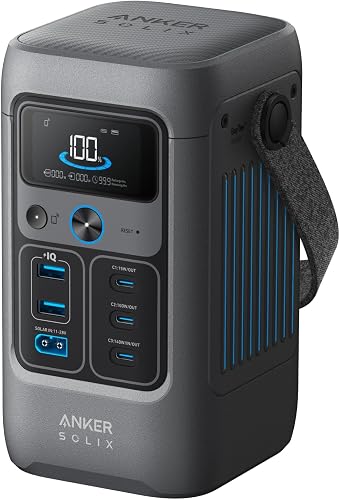
Anker SOLIX C300 Portable Power Station
Best for several devices at camp - 7
 Check it
Anker SOLIX C200 DC Portable Power Station
Best for USB-C backup power - 8
 Check it
Anker SOLIX C200 DC Portable Power Station
Best for DC power with a solar panel - 9
 Check it
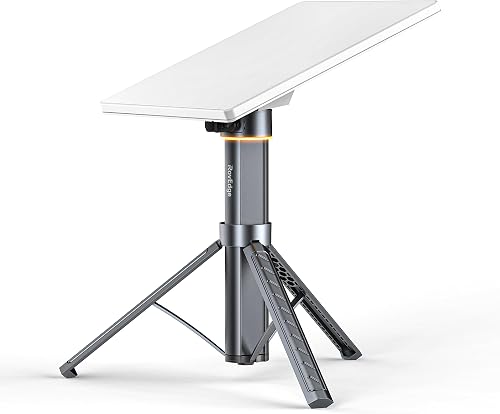
ROVEDGE MK-1 Portable Power Station for Starlink
Best for Starlink Mini outdoors
How we chose power stations for Starlink
The best portable power stations for Starlink combine enough usable energy with an output type and wattage that match the dish and its adapter. We compared capacity, AC or DC options, stated output, portability and recharging methods.
A high wattage rating alone does not guarantee long runtime. Capacity matters too, and an AC adapter may use more battery energy than a direct DC connection.
Our score weighs specs, features and buyer feedback against what you’re shopping for. Confirm the exact Starlink model, its power supply and connector before buying, especially with DC-only stations.
Starlink power station comparison
The Jackery Explorer 300 is the top all-around AC pick here, while the S2000 has the largest capacity for longer backup needs. The DC-only models suit compatible setups and should not be treated as plug-and-play replacements for AC power supplies.
| Product | Best for | Capacity | Rated output | AC outlets | Our score |
|---|---|---|---|---|---|
| Jackery Explorer 300 Portable Power Station | AC-powered Starlink setups | 292Wh | 300W | 2 | 9.7 |
| Anker SOLIX C300 DC Portable Power Station | DC and USB-C gear | 288Wh | 9.5 | ||
| BLUETTI Elite 10 Mini Portable Power Station | a light backup kit | 128Wh | 9.5 | ||
| Anker SOLIX S2000 Portable Power Station | longer backup sessions | 2,010Wh | 9.5 | ||
| BLUETTI Elite 30 V2 Portable Power Station | compact AC power | 288Wh | 9.4 | ||
| Anker SOLIX C300 Portable Power Station | several devices at camp | 288Wh | 3 | 9.3 | |
| Anker SOLIX C200 DC Portable Power Station | USB-C backup power | 192Wh | 8.9 | ||
| Anker SOLIX C200 DC Portable Power Station | DC power with a solar panel | 192Wh | 8.5 | ||
| ROVEDGE MK-1 Portable Power Station for Starlink | Starlink Mini outdoors | 189Wh | 8.0 |
The best power stations for Starlink by use
The right pick depends on whether your Starlink uses an AC adapter or supports a compatible DC connection. Match output and capacity to the full load you plan to run.
Jackery Explorer 300 Portable Power Station: Best for AC-powered Starlink setups
- 292Wh capacity
- 300W rated output
- 2 AC outlets
- 100W USB-C PD port
The 292Wh capacity and 2 AC outlets suit Starlink setups that use an AC adapter, provided the total draw stays within its 300W rated output.
Pros
- Two AC outlets
- Compact 7.5 lb design in product details
- Solar charging supported with compatible Jackery panels
Cons
- 300W rated output limits connected loads
- Solar panel sold separately
The Jackery Explorer 300 is the strongest fit here if your Starlink setup uses an AC adapter and its combined draw stays within the station’s 300W rated output. Its 292Wh capacity is portable, and the two AC outlets leave room for another small device.
At 7.5 lb, the Explorer 300 is easier to carry than larger backup stations. It also has USB-C, USB-A and a car port for charging phones or other gear.
For a rough runtime estimate, divide usable battery energy by the Starlink system’s average watts. Actual runtime will be lower than the simple capacity-to-wattage calculation because of conversion loss and changing power use.
Jackery supports solar charging with compatible panels, which can help during an extended trip. The panel is sold separately, so include it in your setup plan if you need to recharge away from an outlet.
Anker SOLIX C300 DC Portable Power Station: Best for DC and USB-C gear
- 288Wh capacity
- 300W output
- Seven charging ports
- Two 140W two-way USB-C ports
This DC-only model offers 288Wh and multiple USB-C ports for compatible gear, but it has no AC outlet for an AC-powered Starlink setup.
Pros
- Two 140W USB-C ports
- Car socket and USB-A ports
- Solar and car recharging options
Cons
- No AC outlet
- Check Starlink model and connection needs before choosing DC power
The Anker SOLIX C300 DC makes sense when your Starlink setup can run from compatible DC power and you want several charging ports. It provides 288Wh and 300W, plus a car socket and multiple USB-C and USB-A ports.
This model has no AC outlet. If your Starlink power supply plugs into a standard wall outlet, choose an AC model or confirm a compatible DC power method before relying on this station.
Anker supports solar charging with a compatible panel, and the station can also recharge by car or USB-C. Check panel voltage and connector requirements before pairing it with a solar setup.
Its seven ports are useful for mixed device charging, but remember that adding a laptop or other load reduces the energy available to Starlink. Size the station around the total equipment you plan to run.
BLUETTI Elite 10 Mini Portable Power Station: Best for a light backup kit
- 128Wh capacity
- 200W AC outlet
- 4 lb weight
- Built-in 10ms UPS
Its 200W AC outlet can suit a low-draw setup if the Starlink power requirement is within range, while 128Wh makes it better for shorter backup needs.
Pros
- AC outlet in a 4 lb unit
- Solar, AC and car charging
- Built-in UPS feature
Cons
- Smallest capacity in this roundup
- Confirm the Starlink setup stays within 200W
The BLUETTI Elite 10 Mini offers 128Wh and a 200W AC outlet in a 4 lb package. It can suit a short backup session when your Starlink system’s draw stays within that output limit.
Its modest capacity is the main tradeoff. If you are comparing compact options on a tight budget, see our power stations under 100 dollars guide.
Use it for brief connectivity needs or a light travel kit, and consider a larger station if you need hours of service or plan to run other equipment too.
BLUETTI lists AC, solar and car charging options, along with a built-in UPS function. The UPS feature can help keep connected equipment powered during a brief outage, but it does not increase the battery’s energy capacity.
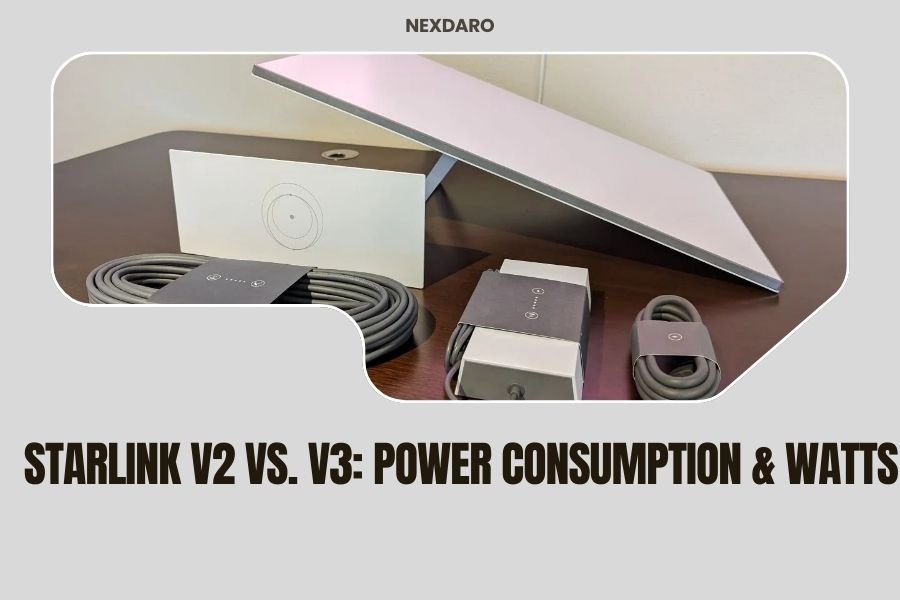
Before buying, estimate runtime using your Starlink model’s average consumption and leave room for conversion losses. Our [Starlink V2 vs.
V3: Power Consumption & Watts](/starlink-v2-vs-v3-power-consumption/) comparison can help you understand how dish generation affects the load.
Anker SOLIX S2000 Portable Power Station: Best for longer backup sessions
- 2,010Wh capacity
- 1,500W continuous output
- Up to 400W solar input
- Eight outlets
The 2,010Wh capacity gives a larger energy reserve for long sessions or additional devices, though the 35.7 lb unit is less convenient to carry.
Pros
- Largest capacity here
- 1,500W continuous output
- Supports up to 400W solar input
Cons
- Heavier than compact options
- No 12V DC port
The Anker SOLIX S2000 is the high-capacity choice, with 2,010Wh and 1,500W continuous output. That reserve can support longer Starlink sessions and additional household or camping devices, subject to the combined load.
For another vehicle-based appliance use, see our power stations for car fridges.
Its 35.7 lb weight makes it less convenient to carry than compact stations, so it suits vehicle, RV or home backup use better than a long walk to a remote campsite. It has eight outlets and supports up to 400W of solar input.
The S2000 does not have a 12V DC port. Plan on using an appropriate AC power supply for Starlink unless your specific setup supports another connection.
Anker’s runtime examples for other appliances do not predict Starlink runtime. Estimate from your dish’s actual average draw, and remember that the station may also power devices that shorten the run time.
BLUETTI Elite 30 V2 Portable Power Station: Best for compact AC power
- 288Wh capacity
- 600W continuous output
- 1,500W power lifting mode
- 10ms UPS switchover
The 600W continuous output gives more headroom than smaller AC units, with 288Wh for a portable reserve. Check actual Starlink draw to estimate runtime.
Pros
- 600W continuous output
- AC, car and solar charging options
- UPS function
Cons
- 288Wh capacity limits extended runtime
- Solar charging cable needs may vary by panel
The BLUETTI Elite 30 V2 provides 288Wh with 600W continuous output, giving more wattage headroom than the 200W and 300W compact models. Its 9.4 lb weight keeps it relatively portable for a station with an AC outlet.
For Starlink, the capacity is a more important limit than the 600W output if the dish uses far less than that. Treat the higher wattage as room for compatible extra devices, not as a promise of longer internet uptime.
The Elite 30 V2 supports AC, car and solar charging, and includes a UPS function. BLUETTI says solar panel connections may require a separate charging cable depending on the panel.
Check the total wattage of Starlink and any added devices before connecting them. If you need longer backup, compare this model’s 288Wh capacity with the much larger S2000.
Anker SOLIX C300 Portable Power Station: Best for several devices at camp
- 288Wh capacity
- 300W output
- Three AC outlets
- Eight charging ports
Three AC outlets and several USB ports help power a Starlink adapter alongside small devices, as long as the combined load stays within 300W.
Pros
- Three AC outlets
- Multiple USB-C and USB-A ports
- Solar, car and USB-C recharging
Cons
- 300W output ceiling
- Shoulder strap sold separately
The Anker SOLIX C300 adds three AC outlets to a 288Wh, 300W station, making it a practical option when Starlink uses its AC adapter and you also want to power small gear. Its USB-C and USB-A ports add charging flexibility.
The 300W rating is shared across the AC outlets, so the total connected load matters. A router, laptop or other device running at the same time draws from the same finite battery reserve.
Anker supports solar, car and USB-C recharging. Its solar guidance includes panel voltage and connector requirements, so confirm compatibility before adding a panel.
Choose the C300 when you want several outlet positions in a compact station. If your Starlink system supports a suitable DC input, a DC-focused model could avoid using an AC inverter, but verify the exact voltage and connector first.
Anker SOLIX C200 DC Portable Power Station: Best for USB-C backup power
- 192Wh capacity
- 200W output
- Five device charging ports
- Up to 100W solar input
This DC model works for compatible USB-C devices and provides 192Wh, but it cannot directly serve an AC-powered Starlink setup.
Pros
- Compact DC charging option
- 140W two-way USB-C port
- Solar and car charging supported
Cons
- No AC outlet
- Charger and solar panel are not included
The Anker SOLIX C200 DC is a 192Wh DC-only station for compatible USB-C and other supported devices. Its 200W output and 140W two-way USB-C port are useful for electronics, but it does not provide an AC outlet for a typical wall adapter.
That distinction determines whether it works for your Starlink setup. Do not assume a USB-C port can power a dish that needs a different voltage or connector.
The C200 DC supports solar and car recharging, and its compact design suits a light kit. The solar panel is not included with this version, and Anker specifies compatible panel requirements.
Consider it when your Starlink model has a confirmed DC power path and you value a small station for other gear. For AC-powered systems, choose one of the AC options above.
Anker SOLIX C200 DC Portable Power Station: Best for DC power with a solar panel
- 192Wh capacity
- 200W output
- Includes a 60W solar panel
- Five device charging ports
This bundle adds a 60W solar panel to the C200 DC package, which can help replenish compatible gear in daylight; it still has no AC outlet.
Pros
- 60W solar panel included
- Car and USB-C charging options
- Compact DC-focused design
Cons
- No AC outlet
- Solar input is limited to the included panel's 60W rating
This C200 DC bundle includes a 60W solar panel with the 192Wh power station. It offers a ready-made way to recharge the station in daylight, though solar conditions affect how much energy the panel returns.
Like the standalone C200 DC, this model has no AC outlet and provides 200W output. It is only appropriate for Starlink if your dish and connection method are compatible with its DC output.
Anker states that the panel and station use a specific solar connection, and the product data notes incompatibility with certain Anker panels. Keep the included cable and compatibility limits in mind if you plan to expand the solar setup.
The bundle’s lower score reflects the same key constraint as the standalone unit: it is not an AC replacement, and the 60W panel does not ensure continuous power through cloudy periods or overnight use.
ROVEDGE MK-1 Portable Power Station for Starlink: Best for Starlink Mini outdoors
- 189Wh capacity
- 30V DC output
- Integrated tripod stand
- IP67-rated housing with port covers closed
Built specifically for Starlink Mini, the MK-1 pairs 189Wh with direct 30V DC output and an integrated tripod. It is not intended for Standard or Gen 3 systems.
Pros
- Purpose-built for Starlink Mini
- Tripod integrated into the unit
- Pass-through charging
Cons
- Not intended for Starlink Standard or Gen 3
- Confirm connector and model compatibility
The ROVEDGE MK-1 is the most direct match for Starlink Mini because it combines 189Wh with 30V DC output and an integrated tripod stand. ROVEDGE says it can provide up to 8 hours under typical conditions, but actual runtime varies with network activity, weather and operating temperature.
This unit is made for Starlink Mini only, not Starlink Standard or Gen 3. Confirm your dish model and connector before ordering, then keep the port covers closed for the stated IP67 housing rating.
The built-in tripod reduces the need to carry a separate stand, and pass-through charging lets the MK-1 recharge while powering Mini. It also has a physical switch, so basic operation does not rely on an app.
Its specialized fit is useful for Mini users who want a combined mount and battery. If you have another Starlink dish, choose a general-purpose station matched to that system’s power input instead.
How much capacity does Starlink need?
Starlink runtime depends on average power draw, usable battery capacity and conversion loss. A larger watt-hour number generally gives you more stored energy, but the dish’s actual consumption and how you connect it matter.
A simple estimate is: usable watt-hours divided by average watts. For example, a 288Wh station powering a 60W load would provide less than 4.8 hours in practice because some stored energy is lost during conversion.
Use your Starlink model’s power information as the input for that estimate. Keep extra devices in the calculation, and leave a buffer if internet access is important during an outage.
AC or DC: which output should you use?
Use AC when your Starlink power supply is designed to plug into a standard outlet, and use DC only when the dish supports the station’s exact voltage and connector. A matching port shape alone does not prove electrical compatibility.
AC stations such as the Jackery Explorer 300 and BLUETTI Elite 30 V2 offer a familiar outlet, though inverter conversion can use some battery energy. DC stations can be compact, but require a confirmed match to the dish.
If you are new to this equipment, our guide to how a portable power station works explains battery capacity, outputs and recharging in plain terms. For a simpler travel configuration, the best portable power station for seniors guide covers ease-of-use considerations.
How do you keep Starlink running longer?
To extend runtime, reduce other connected loads, start with a fully charged station and choose capacity based on the dish’s average draw. Keep the station within its operating instructions and avoid exposing ports to moisture.
Solar input may help replenish a battery during daylight, but panel output varies with sun, angle, shade and weather. A solar panel should be treated as a recharge source, not a guarantee of uninterrupted Starlink service.
For remote work, plan a backup for overnight operation and poor solar conditions. A larger station such as the S2000 stores more energy, while the MK-1 is tailored to Mini users who prefer an integrated tripod setup.
Which power station should you choose for Starlink?
Choose the Jackery Explorer 300 if your Starlink system uses AC and you want a portable station with 292Wh. Pick the Anker SOLIX S2000 for a much larger energy reserve, or the ROVEDGE MK-1 when you have Starlink Mini and want direct 30V DC power with a built-in tripod.
For a DC-only option, first verify your dish’s voltage and connector. Compare your expected runtime against capacity, include every device you plan to run, and allow for conversion losses before relying on a station for essential connectivity.
Our top 3 picks at a glance
-
1
Best for AC-powered Starlink setups
Jackery Explorer 300 Portable Power Station
9.7/10 our score
See it on Amazon -
2
Best for DC and USB-C gear
Anker SOLIX C300 DC Portable Power Station
9.5/10 our score
See it on Amazon -
3
Best for a light backup kit
BLUETTI Elite 10 Mini Portable Power Station
9.5/10 our score
See it on Amazon