How to Charge a Jackery Explorer 1000
To charge a Jackery Explorer 1000, plug the included AC adapter into a wall outlet for the fastest charge, use the car charging cable while driving, or connect solar panels to the DC input. Use only a cable and adapter that match the original Explorer 1000 inputs, and stop if a connector feels hot.
On this page (8 sections)
- How do you charge a Jackery Explorer 1000 from a wall outlet?
- What should you check before you plug in any charger?
- How do you charge a Jackery Explorer 1000 from a vehicle?
- How do you charge a Jackery Explorer 1000 with solar panels?
- How do you charge a Jackery Explorer 1000 safely during travel?
- What should you do if the Explorer 1000 will not charge?
- When should you charge a Jackery Explorer 1000 before storage?
- How do you pick the right charger for the Explorer 1000?
To learn how to charge a Jackery Explorer 1000, start with the wall outlet if you need speed, the vehicle if you are traveling, or solar panels if you are off grid. The original Explorer 1000 has different inputs for each method, so the cable matters as much as the power source.
Match every part to this model. That means the right AC adapter, a car cable made for the DC input, and solar panels connected as Jackery specifies for the 1000.
Do not assume a charger from a smaller Jackery will fit.
How do you charge a Jackery Explorer 1000 from a wall outlet?
Plug the AC adapter into a standard wall outlet, then connect it to the Explorer 1000 input and let it run until the display shows full. Jackery charging while in use depends on the model and connected load; see charging a Jackery while in use.
This is the simplest method and usually the fastest for home use.
Keep the station on a hard, dry surface with airflow around it. The adapter cord should not be pulled, and the connector should seat fully without force.
Our AC Charging Guide: How to Charge from a Wall Outlet covers outlet checks and cord care in more detail. Read it if your wall plug is old or loose.
Which AC cable works for wall charging?
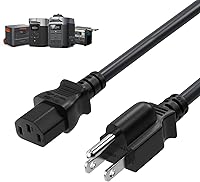
Use an AC power cord rated for the adapter and station, with a grounded 3-prong plug where the design calls for it. A damaged or thin replacement cord can create heat even when the station itself is fine.
The Ancable cord is 6 ft long in orange, with a Type B plug and a heat-resistant jacket rated to 105 degrees. Its 14AWG wire is heavier than light household cords.
Check the plug ends before you order. This cord is a universal AC replacement style, so confirm that its ends match your adapter and station.
Keep it for wall charging, not for solar or vehicle DC inputs.
What should you check before you plug in any charger?
Check the model name, input label, connector shape, and voltage rating before you connect anything. The Explorer 1000 is not the same as the Explorer 1000 Pro, and cables for smaller models may look close but not fit.
Look at the port on the station first. A barrel connector that is too small will sit loose, and one that is too large will not enter at all.
Never force a plug.
Also check the cord for cuts, bent prongs, or a plug that feels warm during normal use. A charger that smells hot or trips a breaker should be unplugged and replaced.
For a broader look at charger types, see our guide to the best jackery explorer 1000 charger. It helps you separate adapters made for this station from those made for smaller Jackery models.
How do you charge a Jackery Explorer 1000 from a vehicle?
Connect the car charging cable between the vehicle socket and the Explorer 1000 DC input, with the vehicle running. Vehicle charging is slower than wall charging, but it is useful on long drives when solar is not available.
Start the vehicle first if your station manual asks for it, then plug in the cable. Keep the cable away from pedals and hot engine areas.
Route it so doors will not close on it.
Plan for a partial charge on short trips. A car socket provides limited power, so a battery that is near empty may need several hours of driving.
Which car cable suits the Explorer 1000?
Choose a 12V/24V car cable with the correct DC7909 or DC8020 connector for your Explorer 1000 input. The connector size and fuse rating matter more than cable color or length.
This Tonton cable is 6.6 ft long, uses 14AWG wire, and has a UL certified 15A fuse. It lists compatibility with the Jackery Explorer 1000 and works with 12V to 24V vehicle systems.
MJPOWER makes a different point about fit. Its 65W AC adapter is made for Jackery Explorer 160, 240, and 290 models, and it states that it does not fit larger models in that family.
That adapter has a 10 ft cord and a 65W output with over voltage, over current, and short circuit protection. It shows why you should match the adapter to the exact station, not just to the Jackery brand.
Stop vehicle charging if the connector becomes hot to touch. Let metal parts cool before unplugging, and do not keep using a loose plug on a bumpy road.
If you need a second opinion on port types, how to use jackery portable charger walks through common Jackery connections.
How do you charge a Jackery Explorer 1000 with solar panels?
Connect solar panels to the Explorer 1000 DC solar input using the cables Jackery specifies for that input. Solar charging works best in direct sun, with panels clean and angled toward the sun.
Set panels on stable ground first, then connect them to the station. Keep the station in shade if you can, since a cooler station is easier to manage while it charges.
Expect the charge rate to change through the day. Morning and late afternoon sun will produce less power than midday sun, and a passing cloud can drop the input right away.
Watch the display for the current input.
How many solar panels should you use?
Use the panel count and wiring method that Jackery lists for the original Explorer 1000. More panels do not help if they are wired in a way the input cannot accept.
Check the input limits printed near the port and in your manual. Then match the panel voltage, current, and connector type to those limits.
Solar charging is a good fit for camping and backup use when the power is out. It is less helpful on cloudy days or in a shaded yard, where wall charging will do the job faster.
How do you charge a Jackery Explorer 1000 safely during travel?
Keep the station upright, secure it so it cannot slide, and use only cables made for its inputs. Travel adds vibration and heat, so loose connections that are fine at home can become a problem in a moving vehicle.
Place the station on a flat surface and stop it from moving with a strap or compartment divider. Keep it away from direct engine heat and out of standing water.
Check the cable every time you stop. Feel the connectors, look for a plug that has worked loose, and confirm the car cable is still seated.
Reseat it only with the vehicle parked safely.
For smaller Jackery models, the steps are similar but the charger may differ. That is why how to charge a jackery explorer 240 is useful for comparison, even though its adapter is not the one you should use on a 1000.
What should you do if the Explorer 1000 will not charge?
First, check the source, the cable, and the port, in that order. A wall outlet with no power, a car socket that is off, or a solar panel in shade will look like a station fault when it is really a source problem.
Try a known good wall outlet with the correct AC adapter. If that works, the issue was the outlet or the original cord.
If it does not, inspect the station input for debris and try again without forcing the plug.
For solar, clean the panels, move them into direct sun, and confirm the connectors are fully seated. For vehicle charging, confirm the vehicle is running and the socket has power.
If a fuse has blown in a car cable, replace it only with the same rating. Do not bypass a fuse or use a higher rating to keep charging.
Our guide on how to charge a jackery battery covers battery care basics that apply when a station sits unused.
When should you charge a Jackery Explorer 1000 before storage?
Charge it to the level Jackery recommends for storage, then check it every few months. Storage charge matters because a battery that sits empty for a long time can fall too low to restart well.
Read the storage guidance in your manual before you put the station away. If you store it for winter, top it up to that level, turn it off, and mark the date.
Set a reminder to check it again.
Keep the station in a cool, dry place while stored. Do not leave it in a hot car or damp shed.
Charge it in a ventilated indoor spot before your next trip.
How do you pick the right charger for the Explorer 1000?
Pick the charger that matches the original Explorer 1000 input, not just the Jackery name. Wall, vehicle, and solar charging each need a different cable, and a replacement part for a smaller model may not fit.
For wall use, start with the adapter that came with your station. If you need a replacement AC cord, a heavier 14AWG cord with the right plug ends is safer than a light spare.
For vehicle use, a fused 12V/24V cable with the correct barrel connector is the key part.
For solar, the panels and their wiring matter more than a single cable. Check input limits, connector type, and panel voltage before you connect anything.
When in doubt, use Jackery's manual for the Explorer 1000 and match every part to it.
That is how to charge a Jackery Explorer 1000 with the least guesswork. Match the source to the input, use the right cable, and let the display confirm the charge.
For generator backup questions, Charging a Power Station with a Gas Generator is a useful next read.
Frequently asked questions
What is the fastest way to charge a Jackery Explorer 1000?
Wall outlet charging with the correct AC adapter is normally the fastest of the three standard methods. Solar and vehicle charging depend on sunlight, panel size, and vehicle voltage, so they usually take longer.
Check the input rating on your Explorer 1000 before connecting any adapter or panel.
Can I use a 65W Jackery 160/240/290 charger on an Explorer 1000?
No. The MJPOWER charger is listed for Jackery Explorer 160, 240, and 290 models, and it states that it does not fit the Explorer 1000 Pro or other larger models.
An adapter that matches a smaller Jackery does not mean it matches the Explorer 1000, so confirm the exact model and connector first.
How long does solar charging take for a Jackery Explorer 1000?
It depends on panel wattage, sun strength, panel angle, and how low the battery is. Strong midday sun with panels wired as Jackery directs will charge faster than cloudy weather or late afternoon sun.
The display on the power station is the best guide during charging, not a fixed time estimate.
Is it safe to charge an Explorer 1000 from a car?
Yes, if you use the correct car charging cable, keep the vehicle running as directed, and check connections for heat. Do not use a cable on a bumpy road if the plug feels loose, and let hot metal connectors cool before unplugging.
A 12V/24V cable rated for your station is safer than a generic light cable.