Which Solar Panels Work with Jackery Power Stations?
Jackery power stations can work with Jackery panels and some third-party solar panels when the panel stays within the station’s solar input limits and its cable matches the input port. Check the manual for voltage, current, wattage, and connector requirements before connecting.
On this page (6 sections)
- How do you check Jackery solar panel compatibility?
- Can you use third-party solar panels with Jackery?
- How do you connect a solar panel to a Jackery?
- Do you need a Jackery adapter or extension cable?
- What should you avoid when matching a panel to Jackery?
- Which Jackery solar panel setup should you choose?
Jackery solar panels compatibility depends on the power station’s input limits and connector, not just whether a panel is advertised for a Jackery. Check the station manual for maximum solar input voltage, current, and wattage, then match the cable to its input port.
A third-party panel can be a fit if its output stays inside those limits. Connector adapters solve plug shape differences; they cannot make an electrically incompatible panel safe to use.
If you are choosing a complete station and panel set, compare options in our best Jackery power stations with solar panels guide.
How do you check Jackery solar panel compatibility?
Check four things before connecting a panel: maximum voltage, maximum current, maximum solar input wattage, and connector type. The station’s manual is the source for its limits; the panel’s label or manual provides its output ratings.
| Check | What to compare |
|---|---|
| Voltage | Panel output voltage against the station’s permitted solar input range |
| Current | Panel output current against the station’s maximum input current |
| Wattage | Panel output against the station’s maximum solar input wattage |
| Connector | Panel cable end and station input port, including any required adapter |
| Connection method | Whether the panel is meant to connect directly or through a charge controller |
Treat the station’s published limits as boundaries, not targets to exceed. If a panel’s open-circuit voltage is above the maximum input voltage, don’t connect it, even if its wattage seems suitable.
A station may accept less power than a panel can produce. Compare 1000Wh power stations with solar panels when choosing a complete setup.
In that case, the station’s input limit can cap the charging rate, but voltage and current still need to meet the manual’s requirements.
Which Jackery solar panel connector type do you need?
The required connector depends on your exact Jackery model. Some Jackery-compatible cables use an 8 mm DC plug, while other stations or panel leads may use DC8020, Anderson, MC4, or another connector.
Don’t identify a port by appearance alone. Check the model manual, look for the port label, and compare the connector name and dimensions before buying a cable.
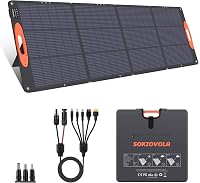
Some solar panels include a cable with several ends. That can reduce adapter needs, but you still need to choose the connector specified for your station and verify the electrical limits.
For a closer look at common plug types, see solar panel compatibility: MC4, DC, and more.
Can you use third-party solar panels with Jackery?
You can use a third-party panel when its electrical output and connector match the station. The brand name alone does not determine compatibility, and a cable that physically fits does not confirm safe voltage or current.
The ZOUPW 100W panel includes a 5-in-1 cable with DC8020, XT60, Anderson, DC7909, and DC5521 connectors. Its maker identifies DC8020 for some Jackery series and DC7909 for some other Jackery models; check your station’s exact port and input limits before choosing an end.
For a specific Explorer 1000 V2 pairing, compare the options in our best Jackery Explorer 1000 V2 solar panel guide.
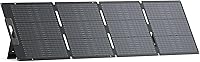
The EBL 200W panel comes with an MC4-to-4-in-1 cable that has XT60, Anderson, DC79*09mm, and aviation connectors. Its listed compatibility does not name Jackery, so verify the exact connector and electrical limits for your station rather than assuming the included cable will fit.
How do you connect a solar panel to a Jackery?
Connect a panel to a Jackery only after confirming it meets the station’s input limits. Use the correct cable, connect the panel and station as directed in their manuals, then place the panel in direct sunlight.
- Read the power station manual and note its solar input limits.
- Check the panel’s voltage, current, and wattage ratings.
- Select the cable end that matches the station port.
- Confirm the connector is fully seated and dry.
- Position the panel in unshaded sunlight and check the station’s input display.
If the station does not show solar input, check the cable path, connector fit, panel position, and manual troubleshooting steps. Don’t force a plug or join cables that are not designed to connect.
For a step-by-step overview of the connection process, read how to connect solar panels to a portable power station.
Do you need a Jackery adapter or extension cable?
You need an adapter only when the panel cable and station port do not match, and the adapter must support the required connection. An extension cable adds reach; it does not change the panel’s output or fix an incompatible connector.
Compare solar panel adapters for Jackery power stations if you need to match plug types. If you need more distance between the panel and station, review Jackery solar panel cables and adapters for cable options.
The Tonton 30 ft cable is an extension, not a direct panel connection. It has a DC7909 (8 mm) interface and needs to connect to the solar panel’s own cable; Tonton also warns that an extension can cause voltage drop and lower charging power.
Tonton says this cable does not work with the Jackery Explorer 300. Check the input port size and model compatibility before buying it.
What should you avoid when matching a panel to Jackery?
Avoid connecting a panel when you cannot confirm its voltage and connector requirements. A matching plug is not enough if the panel exceeds the station’s input limits.
- Don’t exceed the station’s maximum solar input voltage or current.
- Don’t assume a panel’s rated wattage is the power the station will draw.
- Don’t connect two panels in series or parallel unless the station manual permits that setup.
- Don’t leave electrical connections exposed to rain or standing water.
- Don’t use an extension cable if the resulting voltage drop makes charging unreliable.
Panel output varies with sunlight, angle, shade, and other conditions. A panel rated above the station’s wattage limit may be capped by the station, but the panel must still meet the voltage and current limits.
Which Jackery solar panel setup should you choose?
Choose a panel by the station’s input limits first, then cable type and the amount of power you need. For a simple setup, a panel with the right connector can reduce extra cable purchases; for a longer reach, use a compatible extension and expect some power loss.
Pick the ZOUPW 100W panel if its output fits your station and one of its included connector ends matches. Consider the EBL 200W panel only after checking its electrical ratings against your Jackery manual.
If you need added distance, the Tonton cable may suit a compatible DC7909 setup, but it requires the panel’s own lead and is not compatible with the Explorer 300. Recheck the exact station model, limits, and connector before connecting any panel.
Frequently asked questions
Can I use a non-Jackery solar panel with a Jackery power station?
Yes, if the panel’s electrical output stays within your Jackery station’s solar input limits and the cable connects to its input port. Check maximum voltage, current and wattage in the station manual, then confirm the panel and adapter meet those limits.
A matching connector alone does not guarantee electrical compatibility.
What connector does a Jackery solar panel use?
Jackery connector requirements depend on the power station model. Some use an 8 mm DC input, while others use a different connector or may need a matching adapter.
Check the port and manual for your exact model before buying a cable, since DC7909, DC8020 and Anderson connectors are not interchangeable without the correct lead.
Can I connect a 200W panel to a Jackery?
Only if the panel’s voltage and current are within the station’s input limits. A 200W panel may produce less than its rated output in real conditions, but that does not make an out-of-range voltage safe.
Confirm the panel’s electrical specs and the station’s maximum input before connecting it.
Can I use an extension cable between a solar panel and Jackery?
Yes, when the extension cable matches the panel lead and power station port. Longer cables can cause voltage drop and reduce charging power, so use an extension only when you need the extra reach.
Check whether the cable is an extension or a direct-connect lead, and keep connections dry.