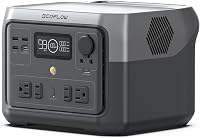
How to Set Up the DJI Power 2000
To set up a DJI Power 2000, charge it fully, check the display and output controls, then connect one device at a time and confirm the wattage. This dji power 2000 setup helps new owners avoid overloads and start with the right charging method.
On this page (11 sections)
- What does a DJI Power 2000 setup need before you start?
- How do you do the first charge for a new power station?
- How do you read the display and use the output controls?
- What is the safe way to connect your first device?
- How do you set up solar charging correctly?
- Which power station suits a home backup setup?
- Which station suits camping and travel power?
- How do you keep a portable power station safe and dry?
- How do you store and care for the battery between uses?
- What mistakes should new owners avoid in the first week?
- What is the best order for a DJI Power 2000 setup?
To set up a DJI Power 2000, charge it fully, learn the display, and connect devices one at a time within the rated wattage.
That simple dji power 2000 setup gives you a safe start for home backup, camping, or work on site.
A first setup is mostly about order.
You check the charge level, find the right output for each cable, and confirm that the total load fits the machine.
The steps below walk through that process in plain language.
What does a DJI Power 2000 setup need before you start?
Start with the power station, its charging cable, your device cables, and the manual.
Put the unit on a flat, dry surface with space around the vents.
Check the charge level on the display before you plug anything in.
A low battery can confuse your first test, so charge it first if it sits below half.
Look at the box contents for your own unit.
Cord types and included accessories vary by model, so do not assume a cable is missing until you check against your manual.
Keep the area dry and clear of loose fabric or paper near the vents.
Airflow matters during charging and under load, and blocked vents can cause heat to build.
How do you do the first charge for a new power station?
Give the station its first full charge with the cable and method named in the manual.
Wall charging is usually the simplest choice for a first charge at home.
Plug the charging cable in firmly and watch the display change.
A steady rise in the percentage tells you the connection is working.
Let the charge finish even if you are eager to test it.
A full first charge gives you a clear baseline for later runtime math.
Use only the charging cable and power source your manual allows.
A wrong cable or an overloaded outlet can damage the unit or trip a breaker.
How do you read the display and use the output controls?
Find the power button, the output switch, and the charge level display before you connect a device.
Most stations keep every output off until you turn it on.
Turn only the output you need.
This keeps the display math simple and helps you see which device is using power.
Note the wattage shown on the display once a device is running.
That number is your best guide to how fast the battery will drain.
If a button combination controls charging speed, eco mode, or the display, learn it now.
Your manual lists these controls, and they differ between brands and models.
What is the safe way to connect your first device?
Connect one low-power device first, such as a phone or laptop, and confirm it charges.
This step proves the port, cable, and output switch all work.
Check the device label for its wattage before you plug it in.
Stay below the rated output for the station, and keep total watts lower when you add more devices.
Use the correct port for the job.
USB-C, USB-A, AC, and car ports each serve different cables, so match the plug to the port shape and rating.
Add a second device only after the first one runs well.
Watch the display for a jump in watts, and stop if you see warnings or hear a fan run at full speed.
How do you run the math on runtime?
Use battery capacity in watt-hours divided by device watts, then expect less in real use.
For example, a 300Wh station running a 60W device gives about 4.3 hours at 85% efficiency.
That math matters for a dji power 2000 setup because a large load drains any station faster than you expect.
A fridge, heater, or power tool uses far more than a phone.
Motors and compressors can draw extra power at startup.
Leave headroom below the rated output so the station does not shut down on a surge.
When in doubt, test the device alone first.
The display will show its true draw, and you can plan from there.
How do you set up solar charging correctly?
Set up solar only with panels and cables your manual names as compatible.
Panel voltage, wattage, and connector type must match the station's solar input.
Place panels in direct sun and angle them toward the sun.
Even a small shadow on one panel can cut the input power.
Connect the solar cable to the correct input, not to an output port.
Check the display for solar input watts before you walk away.
Expect solar charging to change with clouds, time of day, and temperature.
It is a good way to top up power off grid, but it rarely replaces wall charging for a fast full charge.
Which power station suits a home backup setup?
Choose a station with enough watt-hours for your fridge, lights, and phones through an outage.
Our guide to the Best DJI Power Station can help you compare capacity and output for home use.
A home backup plan starts with a list of must-run devices.
Add their watts together, then choose a station that can meet that total with headroom.
The Anker SOLIX C2000 Gen 2 has 2,048Wh capacity and 2,400W rated output, with 4,000W peak.
That size suits a dual-door fridge for up to 32 hours on standby power use of 9W, according to Anker, and it can expand to 4kWh with an added battery.
Anker says it recharges fully in 58 minutes with AC and solar, and in 3 hours with its 800W alternator charger from a car.
It weighs 41.7 lb, so plan where it will live and how you will move it.
Which station suits camping and travel power?
Pick portability first when your power station travels in a car or on foot.
Weight and size decide whether you will actually bring it along.
For a look at DJI options and close alternatives, our roundup of the best dji portable power station breaks down capacity, weight, and output in one place.
The Jackery Explorer 1000 v2 has 1,070Wh capacity and 1,500W AC output, with 3,000W surge peak.
It weighs 23.8 lb and has three AC ports, two USB-C ports, one USB-A port, and one DC car port.
Jackery says it charges from 0% to 100% in one hour with emergency charging through its app, and 1.7 hours by default.
Its LFP battery is rated for 4,000 charge cycles to 70% capacity.
How do you keep a portable power station safe and dry?
Keep the station dry, ventilated, and away from direct heat or sun.
Water and blocked vents are the two most common setup mistakes.
If you use power outdoors, read our guide on How to Waterproof Your Portable Power Setup before you set up in rain or damp grass.
Covers and placement matter as much as the station itself.
Never run a station in a closed car, tent, or room without fresh air.
Keep it upright on a firm surface and do not stack items on top of it.
Check cables for damage before each use.
A frayed cord or bent plug is a reason to stop and replace the cable, not to force a connection.
How do you store and care for the battery between uses?
Store the station at about half charge in a cool, dry place, and check it every few months.
Recharge it if the level drops, following your manual.
Avoid leaving it fully empty for long periods.
A deep discharge can shorten battery life and may make the next charge harder to start.
Use it now and then, even if you mainly keep it for emergencies.
A short run under a light load confirms the display, outputs, and charging still work.
Clean dust from vents with a dry cloth when power is off.
Do not spray water into the unit or open the case yourself.
What mistakes should new owners avoid in the first week?
Avoid overloading the station, using the wrong cable, and blocking the vents.
These three issues cause most first-week problems.
Do not connect a high-draw appliance just because the plug fits.
Check the watts on the device label and compare them with the rated output, not the peak number.
Do not assume every solar panel works with every station.
Match panel voltage and connector type to the manual, and keep the solar cable dry and untangled.
Do not leave the station charging unattended for its very first charge.
Watch the display, feel for excess heat, and confirm the fan and vents work as they should.
What is the best order for a DJI Power 2000 setup?
Follow charge, display, one device, then add load every time you set up.
That order works for home backup, camping, and job site power.
Start with a full charge and a clear surface.
Turn on one output, connect a low-power device, and read the watts on the display.
Add devices slowly and keep a running total.
If the station shuts down or warns you, remove the largest load and try again with headroom.
That step-by-step approach answers the core dji power 2000 setup question.
It keeps you safe, protects the battery, and tells you exactly what your station can run before you depend on it.
Frequently asked questions
What should you do first in a DJI Power 2000 setup?
Charge the unit to a full or near-full level, read the display, and check which outputs match your devices. Connect a low-power device first and keep total watts below the rated output.
Read the manual for the exact buttons and ports on your model.
Can you charge devices while the power station is charging?
Many portable power stations allow pass-through charging, but you should confirm this in your manual. Charging at the same time can add heat and slow the process.
If the unit gets hot or the fan runs hard, pause one task and check the display.
How do you know if a device is too large for a power station?
Add up the running watts for every device you plan to run, then stay below the rated output, not the peak number. Motors and compressors can draw more at startup, so leave headroom.
When in doubt, test one device alone and watch the display.
How should you store a portable power station?
Store it at a partial charge in a cool, dry place and check the level every few months. Recharge it if the level drops too low, following the manual.
Keep it away from direct sun, water, and extreme heat.