Why Is My Solar Panel Parallel Branch Connector Getting Hot?
A solar panel parallel branch connector gets hot when resistance or current is too high at the connection. Shut down the array, inspect the connector and cable, then correct any loose, damaged, mismatched, or overloaded connection before using the system again.
On this page (10 sections)
- Why is my solar panel parallel branch connector getting hot?
- What should you check before touching a hot branch connector?
- Can too much current make a parallel connector hot?
- Can a loose crimp cause a solar connector to overheat?
- Can water or dirt make an MC4 branch connector hot?
- Should you replace a connector that feels hot but is not melted?
- How do you reconnect a solar panel parallel branch safely?
- Could the charge controller be causing the connector to heat?
- How can you prevent solar branch connector overheating?
- What is the safest fix for a hot parallel branch connector?
A solar panel parallel branch connector gets hot when resistance or current is too high at the connection. Shut down the array, inspect the connector and cable, then correct any loose, damaged, mismatched, or overloaded connection before using the system again.
Heat at one branch point is not something to ignore. A poor contact can become hotter as current continues to flow, damaging the plug, cable insulation, and nearby equipment.
Why is my solar panel parallel branch connector getting hot?
The most common causes are a loose contact, a poor crimp, incompatible connectors, moisture, damaged cable, or too much current for the connector. Parallel wiring combines the current from multiple panels, so one weak branch connection can carry a larger load than a series connection.
Solar connectors also heat up when contact resistance rises. Dirt, corrosion, a partly seated plug, a bent contact, or a damaged seal can reduce the quality of the electrical path.
First, turn off the array according to the manufacturer's shutdown procedure. Do not unplug a connector while the panels are producing power unless the equipment instructions specifically allow it.
What should you check before touching a hot branch connector?
Let the connector cool and isolate the solar circuit before inspection. Covering the panels may reduce output, but it does not replace proper disconnection at the inverter, charge controller, combiner, or other system equipment.
Look for:
- Brown, black, or melted plastic
- A burning smell
- Loose locking tabs
- Cracked seals or housings
- Discolored cable insulation
- Water, dirt, or corrosion
- A cable pulled tightly at the plug
- A connector that does not fully seat or lock
Do not touch a hot plug with bare hands. If the connector has melted, replace the affected connector and inspect the cable for heat damage rather than reusing it.
For general connector selection, compare our guide to the best mc4 connectors for solar panels. Choose parts that match the cable size, system voltage, current, and connector type.
Can too much current make a parallel connector hot?
Yes, a parallel array can send more current through a branch connection than a single panel would. The connector, cable, fuse, combiner, and controller must all suit the combined array current.
Check the current from each panel and the total current expected at the parallel connection. A connector rated for 30A may not be suitable if the actual design, temperature, fusing, or installation conditions require a different rating.
The branch connector must also match the wire size. A connection designed for one cable range may not grip a thinner or thicker conductor correctly.
Use a combiner when your array design requires one. Our guide on the mc4 connector box explains how a solar combiner box can organize parallel inputs and provide a suitable enclosure for the circuit.
Does a branch connector carry the current from two panels?
A 1-to-2 branch connector joins two parallel panel circuits, so the common side can carry the combined current from those branches. The exact current depends on the panels and the wiring arrangement.
The LiuBaiWuQuStars 4pcs mc4 y connectors are described as 30A Y branch connectors for connecting 2 solar panels in parallel. They support 14AWG to 10AWG PV cables and include red and black connector paths for polarity identification.
Check the actual panel current before using any branch connector. A connector's printed rating does not make an overloaded array safe.
Can a loose crimp cause a solar connector to overheat?
Yes, a poor crimp can leave too little metal contact with the conductor. That smaller contact area raises resistance and can create heat under load.
A proper crimp should hold the conductor firmly inside the correct contact pin. The cable should not pull out when handled gently, and the pin should sit in the connector body at the correct depth.
Do not fold strands into a terminal, reuse a crushed contact, or rely on twisting wires together inside a plug. Use the correct crimping method for the connector and cable size.
If the connector uses a screw or compression gland, confirm that the cable is fully inserted and the seal is seated. A tight outer cap cannot repair a poor electrical contact inside the plug.
Which replacement connectors suit repeated repairs?
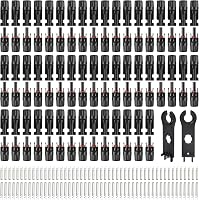
The LEPITERY 100PCS MC4 Soar Connectors Solar Panel kit includes 50 male and female pairs, connector pins, and 2 spanners. It is designed for 14AWG to 10AWG cables and has a stated 30A current rating, 1000V DC voltage rating, and IP67 protection.
Use the same connector type and follow the connector manufacturer's assembly method. For the assembly sequence, see how to wire MC4 connectors.
Confirm that each contact is fully inserted and that the locking connection cannot separate with gentle handling.
Can water or dirt make an MC4 branch connector hot?
Moisture, dirt, and corrosion can increase resistance or interrupt the contact surface. A damaged seal can also let water reach the metal contact, especially in an outdoor parallel array.
Inspect both mating halves for sand, mud, oxidation, or water. Check the sealing ring and cable gland for cuts, flattening, or displacement.
Do not pack an MC4 connector with random grease or sealant. Use only materials approved for that connector system, because the wrong substance can affect seals or contact surfaces.
IP protection is not permission to leave a connector partly locked. The plug still needs a clean mating surface, a complete lock, and proper strain relief.
Can new connectors prevent repeat overheating?
The Usngsny 40 PCS Solar Connectors use tinned copper conductor pins, PPO insulation, IP67 protection, and a stated 30A capacity. The set includes 20 male and female pairs, connector pins, and a spanner for cable sizes from 10AWG to 14AWG.
These features address common installation needs, but they cannot correct a wrong crimp, mismatched connector, or overloaded circuit. Verify the cable size and connection method before fitting replacements.
Should you replace a connector that feels hot but is not melted?
Replace or thoroughly inspect any connector that becomes unusually hot, even if the housing still looks intact. Heat can damage the contact inside before the plastic shows obvious melting.
Compare the warm branch with the other branches only after the system is operating safely and the equipment permits inspection. A single hotter connection is more suspicious than evenly warm connectors in the same conditions.
A non-contact infrared thermometer can help identify temperature differences, but it does not tell you whether the crimp, contact, seal, or cable is defective. Use it as an inspection aid, not as proof that the connection is safe.
If the connector is discolored, smells burnt, feels loose, or has softened plastic, replace it. Also inspect the mating connector because heat can damage both sides.
How do you reconnect a solar panel parallel branch safely?
Match polarity, cable size, connector type, and current rating before reconnecting the branch. Keep the array isolated until every connection is complete and checked.
Use this order:
- Identify positive and negative conductors.
- Confirm that the branch connector matches the cable and mating connector.
- Inspect the cable ends and trim back heat-damaged insulation.
- Install the correct contact using the approved crimp method.
- Confirm that the contact is fully seated in the housing.
- Lock the connector completely and check the seal.
- Route the cable with strain relief and no sharp bends.
- Reconnect the system following the equipment instructions.
- Check the repaired branch for abnormal heat during operation.
Never force two connectors together because their shapes look similar. If the array wiring is unclear, stop and have a qualified installer verify it.
For a different array layout, see how to connect three solar panels in series. Series wiring changes voltage rather than combining panel current in the same way as parallel wiring.
Could the charge controller be causing the connector to heat?
The charge controller may expose a wiring or sizing problem, but heat at one branch connector usually starts at that connection. Check the array design, controller input limits, cable size, fusing, and connector ratings together.
A controller cannot make an undersized or poorly crimped connector safe. Confirm that the array voltage and current stay within the controller's limits in the conditions expected for the installation.
Inspect the cable route from the branch connection to the controller. A damaged section, loose terminal, or undersized conductor can also produce heat farther along the circuit.
Our guide on connecting an mc4 connector to a charge controller covers the cable path and connection points to check.
How can you prevent solar branch connector overheating?
Use compatible connectors, correct crimps, suitable cable sizes, and secure outdoor routing. Keep each connector fully seated, clean, dry, and protected from constant strain.
Before commissioning a parallel array, confirm:
- The connector type matches on both sides
- The cable fits the contact and seal
- The polarity is correct
- The branch current stays within the connector rating
- The cable is not pulled tight
- The locking tabs are engaged
- The connector is not resting in standing water
- The array protection matches the design
Our guide to how to use solar branch connectors for parallel explains the basic layout and connection checks.
A Y connector can simplify a small array, but larger systems may need a properly designed combiner and overcurrent protection. Follow the equipment instructions and applicable electrical requirements for the installation.
What is the safest fix for a hot parallel branch connector?
The safest fix is to isolate the array, replace any damaged connector or cable, and correct the cause before restoring power. Do not keep running the system while a plug is hot, melted, loose, or discolored.
Choose the LiuBaiWuQuStars set for a 30A Y connection between 2 parallel panels. Choose LEPITERY when you need many replacement connector pairs, or Usngsny when a 20-pair kit suits your cable range.
For another connector layout, compare the best solar panel Y branch connector. If the fault returns after a correct repair, stop using the array and ask a qualified solar electrician to check the full circuit.
Frequently asked questions
Is it normal for a solar branch connector to get warm?
A connector should not become noticeably hot during normal operation. Mild temperature changes can happen in sunlight, but a hot plug, soft plastic housing, discoloration, burning smell, or melted insulation points to a connection problem, excessive current, or damaged hardware that needs inspection before continued use.
Can a loose MC4 connector cause overheating?
Yes. A loose or poorly crimped MC4 connection can increase electrical resistance at the contact point.
Current flowing through that resistance creates heat, which can worsen the connection and damage the housing.
Turn off the array, isolate the circuit, and replace damaged parts instead of tightening a melted connector.
Can I connect different solar branch connectors together?
Avoid mixing connector brands or styles unless they are confirmed compatible by the manufacturer. Similar-looking MC4 connectors may have different contact shapes, seals, or locking dimensions.
Mismatched parts can create poor contact, water entry, and heat, even when the plugs appear to fit.
What should I do if an MC4 connector is melted?
Stop using that branch and disconnect the array using the system's safe shutdown procedure. Replace the damaged connector and any heat-affected cable, then check the crimp, polarity, current path, and mating connector.
If you cannot safely isolate the array, use a qualified solar electrician.